Malware is malicious software designed to damage systems or gain illegal access. Common types of Understanding malware is only the first step. Distinguishing spyware from adware, recognizing ransomware indicators, and knowing how viruses enter a system require a deeper look. This guide explores:
- What malware is
- How each type works
- How infections spread
- How to identify early signs of an attack
- Effective ways to strengthen malware protection and response
By the end of this article, you will have a clearer picture of malware and how to stay ahead of it.
What Makes It Dangerous?
Malware is code or software built to compromise a device, network, or application by stealing data, disrupting operations, or weakening security. What is malware in practical terms? Malware can enter a system through a seemingly safe PDF document downloaded from a website or through a link shared by a coworker. It can cause damage to systems long before visible signs appear. This is exactly what makes malware dangerous: it can remain hidden, observe activity, and execute harmful actions before detection.
In 2025, the number of malicious files detected by Kaspersky’s detection systems averaged 500,000 per day (Kaspersky, 2025). These detections reflect the scale of malware activity and reinforce the need for informed and proactive security measures.
How Malware Works: From Entry to Impact
Malware attacks usually begin with an entry point. These entry points include phishing emails, fraudulent installers, malicious ads or websites, and application vulnerabilities. Many malware attacks rely on tricking users, while others exploit system or software vulnerabilities without direct user action.
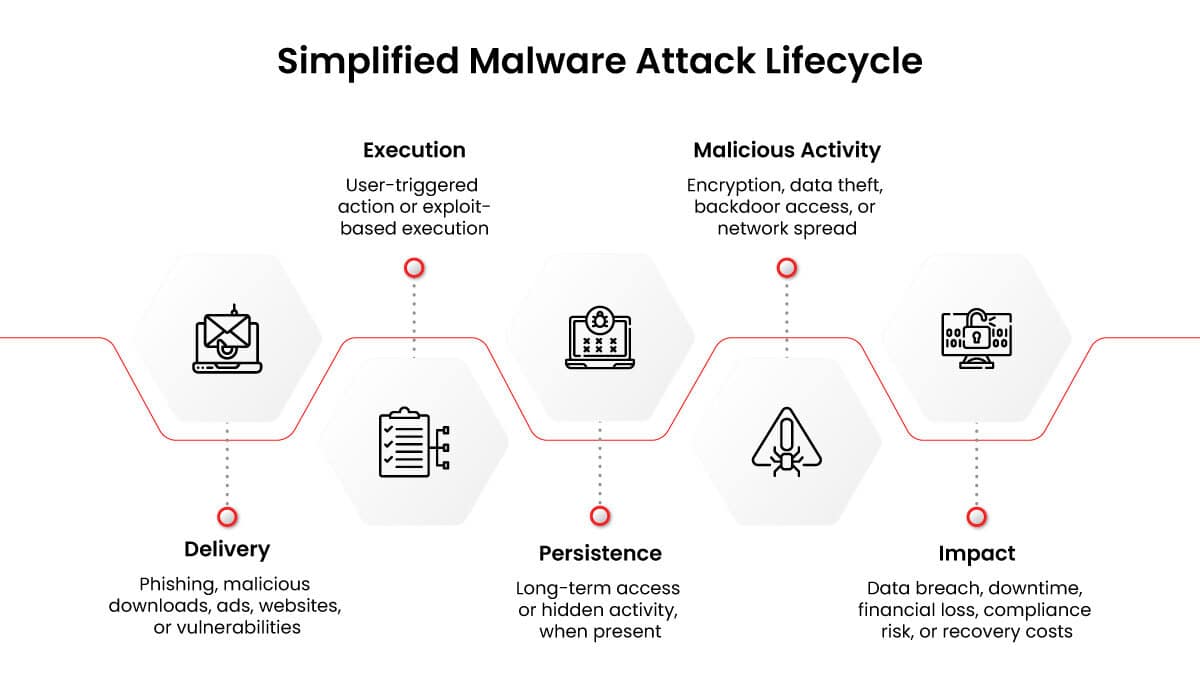
Once malware executes, it may install itself on the system, run in memory, or abuse trusted system tools to avoid detection. This is a crucial stage because the longer malware stays hidden, the more damage it can cause. To persist, malware may:
- Change startup settings
- Create hidden admin accounts
- Disable security controls
- Embed malicious code into trusted software programs
- Disguise its activity as legitimate system behavior
After malware establishes itself, it starts performing its intended task, and the result differs based on the type of malware:
- Ransomware encrypts data and demands payment for decryption.
- Spyware records user actions and steals confidential information.
- Trojans appear legitimate to persuade users to run them; once active, they may deliver payloads such as spyware, ransomware, or backdoor access.
- Worms replicate themselves automatically on a network without user interaction.
With that said, a successful infection can cause:
- Data breaches
- Operational downtime
- Financial loss
- Reputational damage
- Noncompliance with laws and regulations
- Long-term recovery costs
That is how malware works.
Understanding this process is important because malware defense today goes beyond simply blocking malicious files. It also includes continuous monitoring, behavior analysis, access control, and, most importantly, security awareness training.
Types of Malware: Common Variants Attackers Use
Malicious software can take many forms, from computer viruses to ransomware. This section defines 11 different types of malware and includes real-world malware examples, such as ILOVEYOU, MyDoom, WannaCry, and DarkHotel, to show how attackers use them.
Viruses
Computer viruses are one of the most common types of malware. The term “virus” refers to malicious code that attaches to a file, document, or program and spreads when that host is opened, executed, or shared. If not quickly detected, viruses can cause massive damage to IT environments. The infamous ILOVEYOU worm, often referred to as a virus, for example, infected tens of millions of computers and caused billions of dollars’ worth of damage (Griffiths, 2020). It spread via email messages with the subject line “ILOVEYOU” containing malicious attachments.
Worms
A computer worm is a type of malware similar to a virus. The main difference between worms and viruses is that worms can self-replicate and spread through a network without requiring user action. Viruses, on the other hand, attach themselves to a file or program that must be opened or executed before the virus can spread. Examples of computer worms include MyDoom, which caused an estimated $38 billion in damage and replicated by sending emails to the contacts in the victim’s email software (Duncan, 2019).
Trojans
A Trojan, short for “Trojan horse,” is one of the most deceptive malware attack types. Trojans disguise themselves as legitimate software programs, such as games or utilities, while secretly performing malicious actions on the host device. Unlike viruses and worms, Trojans mainly use social engineering techniques to convince users to download and install them.
Ransomware
Ransomware is one of the most disruptive and damaging types of malware. Once activated on the victim’s device, ransomware encrypts files or locks systems, preventing users from accessing them until a ransom is paid. Sophisticated ransomware may also spread to other devices on the network, potentially bringing business operations to a halt. WannaCry, Clop, Petya, and DarkSide are just a few of the well-known ransomware strains.
Adware
Adware is software that displays intrusive and unwanted advertisements on the victim’s computer or mobile phone and may be considered malware when it behaves deceptively or harmfully. Devices are often infected with adware when the user installs free software or downloads an email attachment. Adware can be annoying, but it can also present more significant concerns. It can slow down the device’s performance and even secretly collect information about users and their activities.
Spyware
Spyware is a form of malware that secretly gathers data about users and their activities. The types of information collected by spyware include a user’s browsing activities and login credentials, making it extremely dangerous when spyware remains undetected in an IT environment. One infamous spyware campaign is called DarkHotel, an advanced persistent threat (APT) that targets business visitors at luxury hotel chains (Fokker, 2022). After compromising hotel networks or using hotel Wi-Fi as part of the attack path, the attackers infect victims with spyware, targeting high-profile individuals who may possess valuable data. Without advanced tools, spyware can be difficult or impossible for users to detect.
Rootkits
Rootkits are a type of malware that allows malicious actors to maintain privileged access while hiding their presence from legitimate users. Once installed, a rootkit may allow the attacker to open a backdoor that makes it easier to gain unauthorized access. Rootkits may also contain functionality for stealing data or launching denial-of-service (DoS) attacks. Unfortunately, rootkits are notoriously challenging to detect because they can bypass or turn off conventional security tools such as antimalware and firewalls.
Keyloggers
Keyloggers are tools that record keystrokes and, in some cases, mouse activity on a device. Some keylogging tools have legitimate purposes: e.g., monitoring employee activity or recording user activities during software testing. However, when used without authorization, keyloggers become one of the types of malware attackers use to steal users’ passwords or sensitive financial data.
Wiper Malware
Wiper malware is a destructive type of malware that permanently erases data from a system or device, often rendering it unusable. As the name suggests, wiper malware aims to “wipe” a computer clean of information so that the data is unrecoverable. Wiper malware is often used by threat actors with broader political, financial, or strategic goals.
Mobile Malware
Mobile malware is malicious software designed to target mobile devices such as smartphones, tablets, and smartwatches. Attackers create this malware to exploit mobile technologies and operating systems, such as Android and iOS. One common attack vector for mobile malware is SMS: after users are tricked into visiting a fraudulent link in a text message, they are prompted to download and install malicious code.
Bots/Botnets
A bot is an automated malware program that takes over a user’s system and directs it to perform various activities, often fraudulent or illegal. Malicious actors attempt to spread this bot software to as many computers as possible, creating a network of compromised devices known as a botnet. The attacker can then take control of this botnet and use it for malicious purposes, such as sending spam messages or launching denial-of-service attacks.
Malware Threats to Watch in 2026: What 2025 Data Reveals
Although it is difficult to predict the exact types of malware threats that will impact organizations in 2026, there are certain trends emerging that every business should take note of.
One such trend is ransomware. Ransomware accounted for 44% of all breaches in 2025, marking an increase of 37% from the prior year’s report. A more concerning finding is that ransomware was involved in 88% of all breaches among small and medium-sized businesses, demonstrating that the threat is not limited to large enterprises (Verizon, 2025).
Infostealers, or information-stealing malware, are increasing at a significant rate. During the first six months of 2025, infostealers contributed to the theft of more than 1.8 billion credentials, marking an 800% increase from the beginning of the year. The stolen credentials included corporate and personal email accounts, passwords, and cookies, among other sensitive information (Flashpoint, 2025). The figures indicate that infostealers are a growing malware threat and that stolen credentials can help threat actors gain initial access for broader malicious campaigns.
Lastly, malware targeting mobile devices, especially Android systems, has emerged as a growing organizational concern. Zscaler reported a 67% year-over-year increase in detected Android malware activity, fueled by spyware and banking trojans. The report also identified malicious applications on Google Play, showing how attackers can abuse trusted app marketplaces (Zscaler, 2025). This trend is significant given the increasing use of personal mobile devices for work purposes. As the boundaries between personal and professional device usage blur, attackers gain more opportunities to target sensitive corporate assets that often fall outside organizational security controls.
How Malware Spreads: Through the Moments You Least Suspect
Malware does not always spread due to carelessness. Instead, it often enters systems during routine tasks and activities that happen several times a day. This is what makes it difficult to detect.
Common places where malware hides and spreads include the following:
The Email You Trusted
It came from an address you recognized, about a project you knew, and with an attachment that seemed relevant. Phishing emails have come a long way from the poorly written, suspicious messages of the past. Today, phishing emails created with artificial intelligence can closely resemble legitimate messages, making them harder to detect. A single click can cause severe harm.
The Software You Downloaded
Free software, pirated applications, and software downloaded from third-party websites are among the most common malware delivery mechanisms. The software may operate as intended while malware runs secretly in the background without detection.
The Update You Approved
Even legitimate software update mechanisms can be abused to spread malicious code. Attackers may compromise a trusted vendor and spread malicious code through its update mechanism, which users may approve because the source appears legitimate.
The Network You Connected To
Public Wi-Fi connections, office networks that lack proper security, and personal devices connected to corporate networks also provide routes for malware to spread laterally.
The Device You Shared
An infected USB drive, a shared external hard drive, or a borrowed laptop can introduce malware into an environment. Physical media remains an active malware vector, particularly in environments where cyber hygiene is inconsistent. The uncomfortable truth is that malware often succeeds not because security systems completely fail, but because everything looked completely normal.
Warning Signs of a Malware Infection
Here are some common signs of a malware infection. Recognizing them early can improve the chances of containing the damage before it becomes more serious.
- Sudden system slowdowns, frequent crashes, freezes, or automatic restarts
- Unusual pop-ups, redirects, or browser behavior
- Unknown applications or files appearing on the device
- Disabled antivirus or security tools
- Unexpected password reset requests or login alerts
- High CPU, memory, or network usage without explanation
- Files becoming inaccessible, encrypted, or renamed
- Unauthorized emails or messages sent from user accounts
- Suspicious background processes running continuously
- Reduced storage space caused by hidden malicious files
- Browser homepage or search engine changing automatically
- Unauthorized financial transactions or account activity
- Security warnings from endpoint protection tools
- Multiple failed login attempts across connected accounts
Malware Prevention and Protection: Tips and Best Practices
With so many different types of malware, it’s crucial for businesses and cybersecurity professionals to know how to defend against them effectively. Below are several tips and best practices for malware prevention and protection:
- Use antivirus and antimalware software: The right tools can go a long way toward protecting organizations from malware. Antivirus and antimalware applications can detect, quarantine, and delete suspected malware before attackers can wreak havoc.
- Install software updates: Many cyberattacks occur because malicious actors exploit a security flaw that had already been fixed, but the victim failed to install the patch. Businesses should apply the latest updates to the software and operating systems they use on a day-to-day basis to reduce exposure to known vulnerabilities.
- Practice caution: Phishing and spoofing attacks are among the most common ways malware is introduced into an IT environment. Employees should complete security awareness training to learn how to recognize signs of a suspicious email attachment or link.
- Create backups and disaster recovery plans: Ransomware, wiper malware, and other forms of malware can delete valuable organizational data or render it inaccessible. Keeping regular backups of mission-critical information and applications will make it much easier to recover and restore operations after an attack.
How Ethical Hacking Helps Defend Against Malware Attacks
Understanding how malware works is only the starting point. Defending against it requires the ability to analyze suspicious process behavior, trace how an attacker moves across a network, identify which controls failed and why, and act before an isolated infection becomes a wider compromise.
That is the skill set ethical hacking develops. Rather than studying threats from the outside, ethical hackers work from the attacker’s perspective, examining how malware establishes persistence, how it evades detection, how it escalates privileges, and where each stage of the attack lifecycle creates an opening for defenders to intervene. This turns threat awareness into a repeatable, testable methodology.
EC-Council’s Certified Ethical Hacker (CEH AI) program is one example of a cybersecurity certification that takes this applied approach, using hands-on labs and real-world ethical hacking exercises to develop these skills. As part of this ethical hacking course, participants examine malware types, advanced persistent threats (APTs), fileless malware, malware analysis procedures, and malware countermeasures. Through these topics, participants move from understanding how malware behaves to examining how threats can be detected, analyzed, and disrupted in real-world environments.
Conclusion
Malware threats are not slowing down, and the current threat realities discussed throughout this article make that clear. What they also make clear is that informed organizations and individuals are significantly better positioned to detect, respond to, and recover from attacks than those who are not.
This guide was built to close that gap, from understanding what malware is to recognizing the warning signs on your own device. The next step is applying that knowledge consistently, whether through stronger security practices, professional training, or a more security-aware approach to everyday digital habits.
While attackers invest heavily in staying ahead, the most effective response is to treat malware defense as an ongoing discipline built on visibility, preparedness, and continuous improvement, not as a one-time security effort.
FAQs
Which tools remove malware?
Different types of malware detection and removal tools are widely used to identify, contain, and remove malicious software. Malwarebytes and Microsoft Defender are widely recognized malware detection and removal tools, while CrowdStrike Falcon and SentinelOne are widely recognized endpoint protection platforms that support malware detection, prevention, and response. However, no single tool guarantees complete removal, particularly for rootkits and fileless malware. In severe cases, a full system reimage or rebuild may be the most reliable path to a clean state.
What is malware, and how is it different from a virus?
A virus is a specific type of malware. It attaches itself to a legitimate file or program and replicates when that file is executed. Malware, on the other hand, is the broader category that encompasses all malicious software, including ransomware, spyware, Trojans, worms, and others. Think of it this way: every virus is malware, but not all malware is a virus. The distinction matters because different types require different detection and response strategies.
How can I help prevent malware attacks?
Preventing malware attacks comes down to layered, consistent security practices: keeping all software and operating systems updated to reduce exposure to known vulnerabilities, using multifactor authentication (MFA) to limit the damage of compromised credentials, and exercising caution with unsolicited emails, links, and downloads, regardless of how legitimate they appear. No single tool guarantees protection, but layering these practices significantly raises the barrier for attackers.
References
Duncan, B. (2019, July 26). MyDoom Still Active in 2019. Unit 42, Palo Alto Networks. https://unit42.paloaltonetworks.com/mydoom-still-active-in-2019/
Flashpoint. (2025). Flashpoint’s Global Threat Intelligence Index: 2025 Midyear Edition. https://flashpoint.io/resources/report/flashpoint-global-threat-intelligence-index-midyear/
Fokker, J. (2022, March 17). Suspected DarkHotel APT activity update. https://www.trellix.com/en-us/about/newsroom/stories/research/suspected-darkhotel-apt-activity-update/
Griffiths, J. (2020, May 4). ‘I Love You’: How a badly-coded computer virus caused billions in damage and exposed vulnerabilities which remain 20 years on. https://www.cnn.com/2020/05/01/tech/iloveyou-virus-computer-security-intl-hnk/index.html
Kaspersky. (2025, December 02). The number of the year: Kaspersky detected half a million malicious files daily in 2025. https://www.kaspersky.com/about/press-releases/the-number-of-the-year-kaspersky-detected-half-a-million-malicious-files-daily-in-2025
Verizon. (2025). 2025 Data Breach Investigations Report. https://www.verizon.com/business/resources/T16f/reports/2025-dbir-data-breach-investigations-report.pdf
Zscaler. (2025). Zscaler ThreatLabz 2025 Mobile, IoT, & OT Threat Report. https://www.zscaler.com/campaign/threatlabz-mobile-iot-ot-report