Introduction
How would you start your pen test? I prefer to start not with the application, but with everything that surrounds it. This not only saves time, but it’s also a great approach to make sure you have a full understanding of the application.
Yes, you have the scoping document in your hands, and it explains domains, API, authentication, and all that, but this is not a strong gate. What if you can find additional information online, like old hostnames, code references, or public posts that say a little more than needed?
This is why I use OSINT as part of the test, not just as a nice-to-have approach.
Before I send a request with an attack payload, I want to have a holistic picture of what is there: What looks current, what looks neglected, what looks bolted on later, and what looks like it belongs to a completely different era of the company.
I am not trying to collect the largest possible pile of recon data. That usually turns into a spreadsheet graveyard. I care more about useful direction than volume. One odd clue that changes how I think about the target is worth far more than another hundred passive results I cannot explain.
In one test, an old PDF ended up being more useful than the whole initial subdomain list.
That, for me, is the point of OSINT: better judgment early, fewer assumptions later.
Why OSINT Matters in Penetration Testing
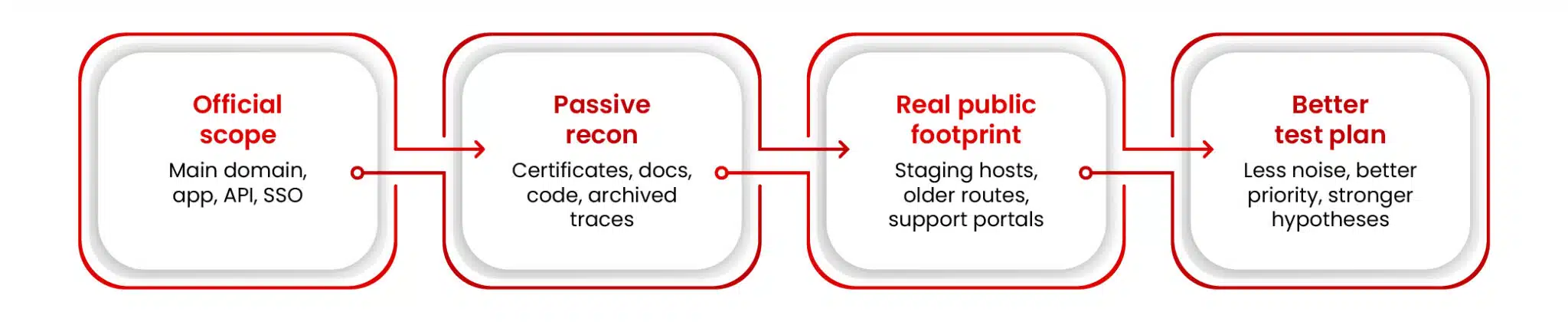
Because the target you get on paper is usually the cleaned-up version. The one on the internet is older, messier, and usually a bit more honest.
On paper, it may be three domains, one application, one API. Then you dig a little and find a staging host in certificate logs, an old support portal that still answers, or a PDF with internal names inside. Sometimes a GitHub repo tells you more than the kickoff call did. That happens more often than it should.
For me, that is where the target starts to look real.
I prefer to start testing with a full and clean understanding of the target. I want to know what clearly belongs to the company, what probably belongs to it, and what only looks related from a distance. Those are three very different things. If I mix them up too early, I usually create extra work for myself later.
OSINT also helps me decide what deserves attention first. I do not look at a polished homepage and an old login host the same way. A marketing page is one thing. A customer portal is another. An exposed API is yet another thing. And if I see something called legacy-admin or staging-auth, yes, I am going to pay attention. Maybe it is nothing, maybe not.
I’ve lost time on the other kind of approach before. Something looks interesting, you start your research on it, and an hour later, you’ve got nothing except tabs open. Good recon helps a bit with that.
It also helps me start with better assumptions. If Azure, Okta, and React show up early, at least I know what I’m dealing with. Same with old docs, weird route references in JavaScript, or certificate logs full of hostnames nobody brought up. It gives me a better next move.
OSINT also helps with scope in a more practical way. I am not saying every asset I find should suddenly become testable. But even when something is out of scope, it can still tell me useful things, such as naming conventions, shared infrastructure, old technologies, and authentication patterns. Sometimes I cannot touch the system, but I can still learn from it.
So no, I don’t do recon just to say the recon phase is done.
Once I have a live app in front of me, I usually switch to the browser and see what else it gives away. That is where I like using OWASP PTK, not instead of OSINT, but after it. First, I gather clues from public sources, then I look at the application itself, and see what else the browser is willing to show me.
For me, that is why OSINT matters. It makes the test less blind, less noisy, and usually more interesting. And sometimes it tells you more about the target than the target planned to tell you.
A Practical OSINT Methodology for Pen Testers
Otherwise, it gets messy very quickly. You can open 20 tabs, save a few screenshots, copy some subdomains into a note, even find a GitHub repo or a PDF file, and after half an hour, you are not even sure what matters anymore. I have been there too. It feels like progress, but often it is just movement.
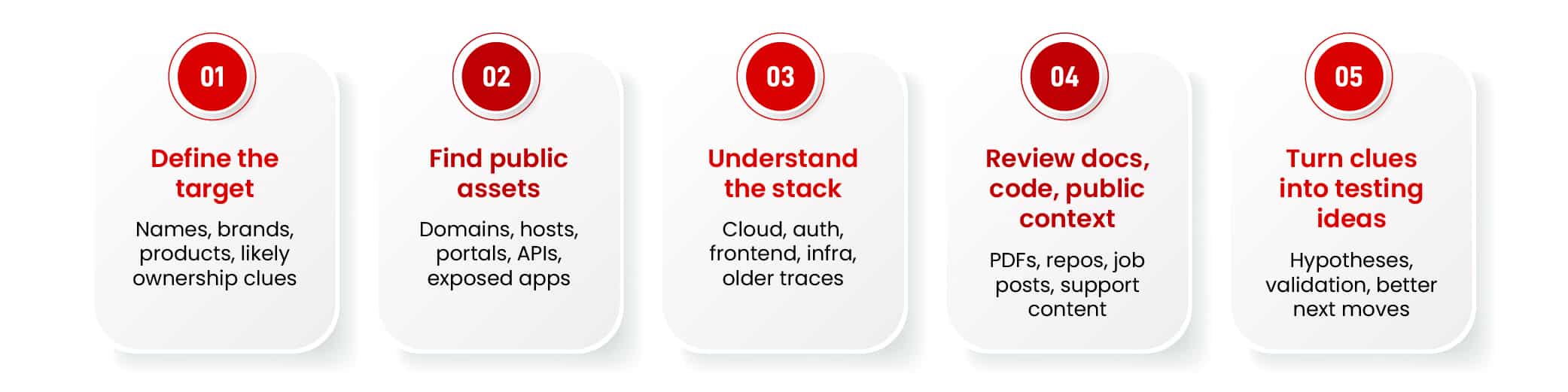
For me, the flow usually looks like this: define the target, find public-facing assets, understand what technologies are in play, look at people, documents, and code exposure, and then turn all of that into testing ideas. Not a perfect academic framework, just a way to stop recon from becoming random.
In real life, this jumps around a bit. You find one hostname; it leads to a document that gives you a naming pattern, which leads to another host. That is common. Every step should give you something useful for the next one.
Define the Target
I always start here, even if the scope looks clear. Because “clear” on paper does not always mean clear in reality.
The scoping document may list the main domain, the application, an API, or authentication details. But I also want the rest of the picture: brand names, old domains, regional domains, support portals, login pages, maybe even product names that could appear in public records or certificates later.
Names matter more than people think. Sometimes the legal company name is one thing, the product brand is another, and the DNS naming is something else. If I do not get that straight early, I make the rest of the recon harder for myself. And there is no need for that.
This is also where I try not to make assumptions. Just because a hostname contains the company name does not mean it belongs to them. Just because they use a SaaS platform does not mean I can treat that platform as part of the target. You don’t want bad assumptions to ruin your pen test, so I try to keep them under control.
What I want at the end of this step is simple. I want to know who I am looking for, which names are likely to show up, and what should count as standard when I start finding things.
Find Public-Facing Assets
This is where the target starts getting more interesting.
Now I want domains, subdomains, live hosts, exposed apps, APIs, support systems, old portals, remote access points, staging environments, anything public that might matter later. Not everything I find will be useful. The point is not to collect everything. The point is to find the parts that deserve attention.
This is also where people get a bit carried away.
You may think that a big list of subdomains is really good, but then you realize that half of it is junk or dead hosts. I would rather have 20 assets I understand than 200 I cannot explain.
It’s better to go broad first and then start cutting. Which hosts are live? Which ones expose something real? Which ones look connected to the company? Which ones are just noise? That filtering matters a lot more than people think.
And I do not treat every asset the same. A homepage is one thing. A login page is another. A forgotten support portal is yet another thing. A subdomain with staging-auth host looks more promising than a landing page and definitely requires more attention.
I also try to answer one boring but very important question for each asset: why do I care? If I cannot answer that, it usually means I am collecting things just to feel productive.
Understand the Technologies and Infrastructure
Once I know what is exposed, I want to know what I am looking at.
However, I do not need a clean diagram of the full stack before I start; I only want some idea: Cloud provider, auth platform, frontend framework, maybe WAF, maybe CDN, maybe storage, maybe some obvious backend clues. Enough to stop guessing.
This part helps more than it looks.
If I know they are using Azure and Okta, I already have a different picture in my head than if I see something self-hosted and older. If the frontend is heavy on React and the JavaScript is full of route references, that tells me one thing. If I see older libraries, old API versions, or unusual mixed behavior between pages, that tells me something else.
This is also where I like to use OWASP PTK. Not as a replacement for recon, more like the next step once I already have a live application.
First, I collect clues from public sources. Then I open the app and see what the browser is willing to give me. OWASP PTK is useful here, especially its recon mode, when no active attacks are executed, but we still can get a lot of information, such as client-side code, headers, auth flows, crawled links, and other small details that are easy to miss if I stay only at the hostname level.
That usually gives me a better feel for what kind of application I am dealing with. Sometimes the browser tells you more than the documentation ever will.
I also care about old infrastructure here, including previous certificates, historical DNS, archived pages, and older cloud traces. A lot of those things are not directly testable, but they still tell a story. Sometimes the system is gone. Sometimes it is half-gone. Sometimes it is “gone” in the way people say they cleaned up the garage, but somehow everything is still there.
That history matters.
Look at People, Documents, and Code Exposure
This is where OSINT often starts getting really useful. Because the best clues do not always come from the application itself. You can find something really interesting in a PDF, a GitHub repo, a job ad, a support article, a conference talk, or some engineering post that says more than the author probably meant.
Any public information and documents, especially, are good for this, as these things can leak internal names, metadata, software references, directory paths, and all sorts of small details. While one file on its own may not matter much, a pattern across a few files often does.
Same with public code. A repository can tell you a lot: API paths, environment names, internal naming habits, CI/CD references, storage clues, and sometimes secrets too. Even when the secret is dead, the context around it can still be useful. I do not look at public code because I expect every repo to contain gold. I look because even mediocre code exposure can tell me how the target thinks.
And then there is the public company footprint around all this, such as job posts, engineering blogs, support portals, vendor case studies, and employee profiles. Not for personal details; I do not care about that. I care about technical context. If a company has job ads mentioning Kubernetes, Okta, Azure, GitHub Actions, and internal tooling, then I already know the visible application is probably not the full story.
Turn Findings into Testing Ideas
OSINT on its own is just information. What matters is what I do with it next.
Once I have a few useful clues, I try to turn them into actual testing ideas. Not big formal theories, but practical thoughts. If I see few staging-style subdomains, I will think that I need to check them for weaker controls. If I find old internal naming in document metadata, maybe I can use that pattern to look for related systems. If JavaScript references routes that are not visible in the UI, would it be helpful to check those routes? If a public repo shows storage paths or environment names, maybe there is something interesting in how those environments are separated.
I also try to write those down in plain language. What I found, why I care, and what I want to check because of it. Nothing fancy, but something to help me keep the link between recon and testing clear.
Otherwise, you end up with a lot of notes and no decisions, which is a very common OSINT problem.
And one more thing: not every clue deserves equal time. Some things are strong leads, and some are weak. Some are just odd and probably go nowhere. This is normal, and the actual trick is not to fall for every strange hostname you see.
So that is my OSINT methodology, if you can even call it that. Keep it simple. Stay skeptical. Follow the clues that change your understanding of the target.
That is usually enough.
The Most Valuable OSINT Areas to Investigate
Not all OSINT deserves the same amount of attention.
That sounds obvious, but this is where recon often starts drifting. You find 10 different trails, all of them look at least a little interesting, and then suddenly you are deep into things that do not really change the test. I try to stay away from that.
When I do OSINT for a pen test, I care most about the parts that change what I do next. Plenty of things online are interesting. That does not mean they are useful.
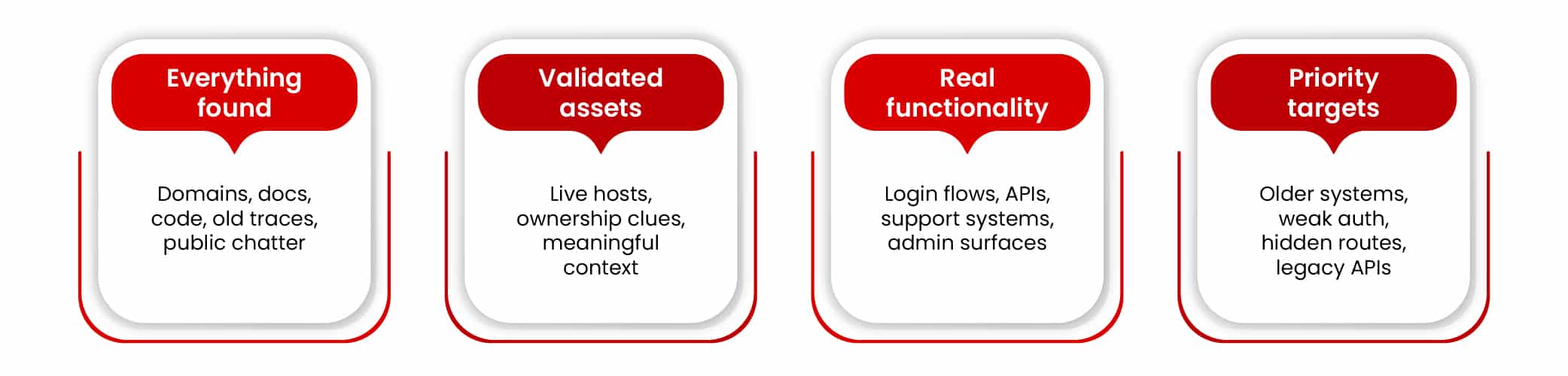
I keep coming back to the same areas most of the time: domains, live applications, public documents, public code, older infrastructure traces, and whatever the company has already said about itself in public. Those are usually the places that give me something real to work with.
Domains and Subdomains
This is still the first place I look. Domains and subdomains tell me what kind of estate I am dealing with: main sites, login hosts, APIs, support portals, regional domains, and product domains. Sometimes, older brand names. Sometimes something that looks like it was never meant to be visible from the outside in the first place.
That first picture matters.
I do not care much about the total number on its own, though. A huge list of subdomains looks good in a screenshot. That is about all I can say for it.
What I care about are the strange ones: staging, qa, dev, legacy, vpn, admin, beta, things like that. Not because they are automatically vulnerable. They are not. But they often point to systems built to be useful rather than polished, and those tend to be more interesting during testing.
Subdomains also help with naming. Once the naming starts making sense, other related assets get easier to spot. That is one of the reasons this area is so useful. It is not only discovery. It is also pattern recognition.
Public Applications, Login Surfaces, and APIs
Once I know the hosts, I want to know what is sitting behind them.
A live application tells me more than a hostname. A login page tells me more than a plain landing page. An exposed API can tell me even more. This is usually the point where the target stops being a list and starts becoming something I can reason about properly.
It also makes prioritization easier.
A brochure site is one thing. A customer portal is another. A support portal is yet another thing. Same with admin panels, account areas, mobile backends, upload flows, password reset paths, and all the other pieces that carry real functionality. Those are the parts I want to notice early.
This is also where OWASP PTK becomes useful to me. Once I have a live app in front of me, I do not want to keep looking only from the outside. The browser usually gives away a bit more. With PTK, I can watch more of what the app is doing while I am in it: routes, requests, bits of client-side code, auth behavior, that sort of thing. That is the kind of context I want after passive recon has already done its part.
Exposed Documents and File Metadata
Public documents still get ignored more often than they should, which is strange, because they leak useful details all the time. PDFs, spreadsheets, manuals, guides, slide decks, partner documents, support files, and old downloads can reveal internal hostnames, usernames, paths, email formats, software references, metadata, and naming habits that turn out to be more useful than they first look.
Sometimes one file gives me almost nothing. But if I see the same naming style, the same software trail, or the same internal references across a few files, that usually starts getting interesting.
Sometimes one old document tells me more than the first recon pass did. So yes, I always check them.
Public Code Repositories and Code References
Public code is one of the better OSINT sources when it is relevant.
Not every repo hit matters. A lot of them do not. But the good ones can be very good. Code often gives away the habits behind the environment: route names, older API paths, config patterns, storage names, internal naming, bits of CI/CD, all the small details that say more than they were supposed to.
Even small references can help: a path in a JavaScript file, a README mentioning an old API base, a leaked config snippet, a deployment note. None of these has to look dramatic on its own. Put together, they start telling a story.
And yes, secret search belongs here too. Sometimes you find tokens, keys, or credentials. Sometimes they are already dead but still worth noting. Even a dead secret can tell you something about the environment around it.
Infrastructure History and Older Traces
I spend a lot of time looking at old traces. Sometimes more than the current ones.
Historical DNS, old certificates, archived pages, older cloud references, old IP links, previous service fingerprints—these can all tell you things the current target no longer says out loud. Maybe the system is gone. Maybe it is half-gone. Maybe it moved somewhere else and kept the same naming pattern. This is usually where “retired” starts sounding a bit optimistic.
And even when an old asset is dead, it can still be useful by revealing internal system naming, older route structures, or a previous provider or platform that still appears somewhere else.
That is why this area matters. It gives the target a memory.
Employee and Company Footprint
This is the part some people overdo, and others ignore completely. I try to stay somewhere in the middle.
I am not interested in personal trivia. I do not care where someone had coffee or what conference badge they posted on social media. What I do care about is gathering technical context from job ads, support articles, engineering posts, vendor write-ups, conference talks, and employee profiles that list tools or platforms. Put together, they can tell you quite a lot about the stack and how the place is run.
If I keep seeing references to Okta, Azure, Kubernetes, GitHub Actions, some cloud security platform, and internal developer tooling, then I already know the visible application is probably only part of the picture. If support docs describe user roles or workflows in more detail than the application itself does, that matters too.
This kind of OSINT gets stronger when it lines up with what I already found elsewhere. When domains, repos, documents, stack clues, and public company footprint point the same way, my confidence goes up. And when they do not line up, it usually means something is still missing from the picture.
What I Keep Coming Back To
If I had to reduce all of this to one point, it would be this: the best OSINT areas are the ones that help me decide what to do next.
I want to know what exists, what matters, what looks old, what looks exposed, and what gives me a better sense of where the real attack surface begins. Domains help with that. Applications do too. Documents, code, older infrastructure traces, and public company footprint do as well.
Everything else can wait.
Useful OSINT Tools for Pen Testers
There is no shortage of OSINT tools. The real problem is that it is very easy to spend more time collecting tools than collecting useful clues. You find one framework, then another tool, then a bigger list, then some “top 50 OSINT resources” page, and suddenly half the session is gone and you’ve still not learned much about the target.
I try to keep it practical. I do not need a huge toolkit for the sake of it. I need a few tools that help me answer the next question. What is exposed? What is live? What used to exist? What does the code say? What does the browser say once I get into the app? That is enough.
Start with Something That Helps You Branch
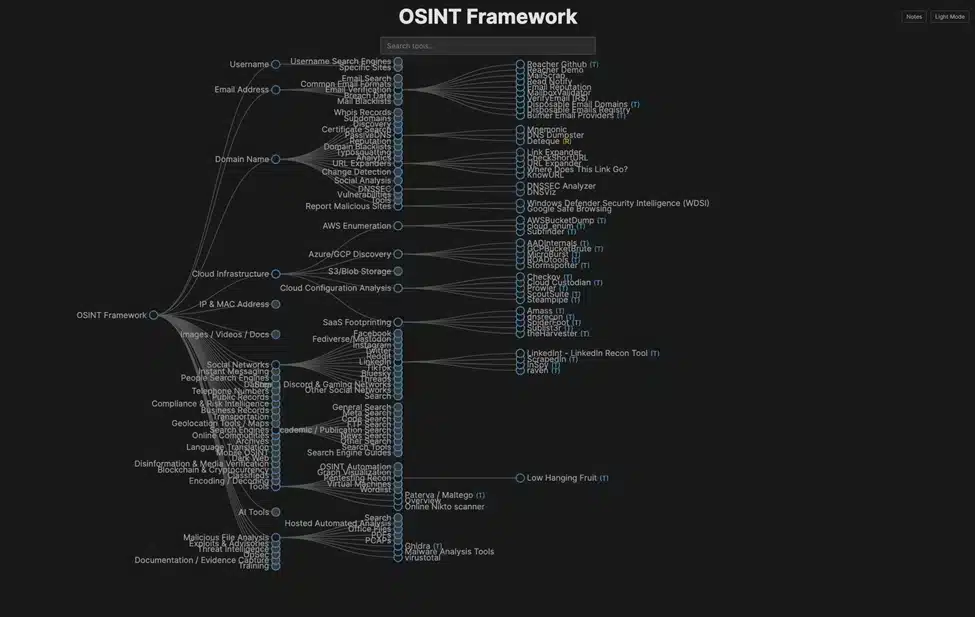
Not as a workflow, more like a map.
If I already have a domain, an email address, a username, a document, or some other starting clue, it helps me see where I could go next. That is useful, especially when I want to follow one specific thread a bit further without wasting time jumping between tools.
But I would not treat it like a process, or you end up clicking through branches for an hour and calling it recon.
For me, the OSINT Framework is a reference point. Good for direction, not something I follow step by step.
Tools for Domains, Subdomains, and Exposed Hosts
When I am building the first picture of the target, I want tools that help me find public-facing assets quickly. I then trim the list down.
Amass and Subfinder are good for building out a first pass of domains and subdomains without doing all of it manually. I just want a decent starting list from them.
After that, I usually want to know what is alive. This is where something like httpx becomes handy. A list of names is one thing. A list of live hosts with titles, response codes, and a bit of tech context is much easier to work with.
This is the pattern I usually follow here: discover first, reduce second.
Tools for Certificates, History, and Old Traces
A lot of useful OSINT comes from things that are no longer front and center. Old certificates, older DNS records, archived pages, previous service traces, or things that were supposed to disappear but only half did.
That is why I always spend time with certificate transparency sources, the Wayback Machine, and historical DNS tools when I can. These are not flashy, but they are often where the better clues come from. A certificate log may show a host nobody mentioned. An archived page may reveal an older route structure. Historical DNS may show naming patterns or providers that still matter elsewhere.
This kind of recon does not always give you something testable, but it can help you better understand what the next step should be.
Tools for Infrastructure Search
Sometimes I want to look at the infrastructure around the target a bit more directly. That is where Shodan and Censys can be helpful.
I do not use them as magic boxes. I use these tools when I already have something in hand, and I want to expand that lead a little. Maybe there are other exposed services. Maybe the same infrastructure shows up elsewhere. Maybe an old clue still lines up with something live.
Used carefully, these tools are useful.
Used carelessly, they are a great way to disappear into interesting but irrelevant infrastructure for an hour.
I have done that too. Not recommended.
Tools for Documents and Metadata
Public documents are still one of the easiest ways to learn more than the target intended.
I want something quick that helps me pull metadata and useful details out of any files I can find, like old PDFs, Word documents, csv, json, etc.
ExifTool is still good for this purpose. Simple, reliable, and usually enough. Sometimes all I need is a username, software name, document path, timestamp, or a bit of metadata that confirms a naming pattern I already suspected.
One document may not do much. A few documents pointing in the same direction usually do.
Tools for Public Code and Secret Search
Like stated earlier, there is a chance to find more than the visible application shows in public code. I spend time with GitHub search and targeted code searches when it makes sense. Not because I expect to find something critical in every repo, but because code often explains the target better than anything else.
Sometimes it is the code. Sometimes a README. Sometimes it is a forgotten issue or deployment note. It all counts.
Tools for Browser-Side Recon
Once passive recon gets me to a live application, I usually want to stop looking only from the outside. This is where OWASP PTK fits for me.
I use it with recon mode, with no active attacks, but it still can help me to inspect client-side code, requests, routes, headers, auth flows, and who knows, maybe even secrets in JavaScript comments. That matters because some of the best clues only show up once the frontend is doing its thing.
For me, this is the bridge between broad recon and actual testing. First, I figure out what exists. Then I use the browser to understand it better.
The Main Thing That Matters
Do not overthink the tool list. A smaller set of tools you know how to use is worth more than a giant collection you touch once every few months. Tools help, but they are not the methodology. They support it.
If the process is weak, more tools only help you collect noise faster.
That is why I try to keep the toolkit practical. A few tools for discovery, a few for history, a few for code and documents, and something for the browser once I get into the app. That is usually enough.
The important part is not how many tools I used. The important part is whether they helped me make better next moves.
Common Mistakes and Best Practices
OSINT is not hard to start. It is hard to keep useful.
Most people do not fail at recon because they missed some advanced sources or did not know enough tools. The failures stem from these key mistakes: collecting too much, trusting weak clues too early, and losing the link between the recon and the actual test. I have done all these at different points, so none of this is theoretical.
Mistake 1: Collecting Too Much and Calling It Progress
This is probably the most common one. You find subdomains, screenshots, PDFs, old DNS records, repo hits, archived pages, employee profiles, and random infrastructure clues. It feels like good momentum. Sometimes it is. Sometimes it is just a bigger pile of stuff. A lot of recon looks productive long before it becomes useful.
The fix is simple, at least in theory. Keep asking one question: Does this change what I do next? If the answer is no, it may still be interesting, but it probably does not deserve much more time.
I try to be a bit ruthless here. If a lead is weak, unclear, or not changing my view of the target, I park it. Otherwise, recon becomes digital hoarding, with more tabs open.
Mistake 2: Assuming Ownership Too Early
This one causes a lot of bad decisions. A hostname contains the company name. However, that does not automatically make it theirs. A SaaS platform is branded with the company logo. That still does not mean I can treat it as in scope. A support portal looks connected. Maybe it is just hosted for them by someone else.
I categorize the clues into three areas: clearly belongs, probably belongs, and only looks related from a distance. This distinction matters more than it sounds.
If I get lazy with ownership, I waste time and make the rest of the recon messier. Worse, I may end up building testing ideas around the wrong thing.
Mistake 3: Treating Every Asset as Equally Interesting
They are not. A polished homepage is not the same as a login flow. A static site is not the same as an API. A brand microsite is not the same as an old support portal or something called legacy-admin. This is where prioritization matters.
I usually care more about authenticated applications, support systems, admin functionality, upload flows, password reset paths, and older-looking systems than I do about pretty marketing pages. That does not mean the simple assets never matter. It just means I do not give everything the same weight from the start. If I do that, I end up spending time in the wrong place.
Mistake 4: Using Tools Without a Method
This one is easy to fall into, especially because there are so many OSINT tools around.
You run a few discovery tools. Then you try a historical source. Then you search GitHub. Then you end up in Shodan. Then maybe the OSINT Framework sends you off in another direction. While none of this is wrong on its own, the problem starts when the tools become the workflow. I try not to let that happen.
The tools should support the process, not replace it, and I need them to help me answer questions, not add five more. Otherwise, the recon session starts feeling busy without becoming clearer. That happens more often than people admit.
Mistake 5: Ignoring Documents and Code Because They Look Boring
This is a quiet mistake, but a very common one. Documents and public code do not always look exciting at first glance. They take time and slow you down. But they help you find details that the rest of the recon cannot find, such as API paths, environment names, old deployment clues, and sometimes secrets.
I have had more than one case where a document or code reference ended up being more useful than the first round of hostname discovery. So I do not skip them.
Even when a repo hit is weak, even when a PDF looks unremarkable, I still check. Not forever, just enough to see whether it changes the picture.
Mistake 6: Never Turning Recon into Testing Ideas
This is a big mistake. A lot of OSINT work stops at collection: nice notes, long list, good screenshots.
I think that you cannot mark recon as complete until you have a clear “here is what I want to test and why” next step. Without this, OSINT work may still be useful, but incomplete.
I try to turn the better clues into simple testing ideas as soon as possible.
- Staging hostname may suggest weaker controls.
- JavaScript route reference may suggest hidden or older functionality.
- Internal naming in document metadata may help me look for related assets.
- Repo mentioning storage or environments may push me to think about separation problems or forgotten exposure
That is where the value lies: in the follow-up, not the collection.
What Tends to Work Better
To summarize the above, the best OSINT is usually not the biggest or the cleverest. It is the one that stays tied to the engagement.
For me, this means following a few simple habits:
- Start broad, then narrow.
- Validate ownership before you get attached to a lead.
- Prioritize assets that carry functionality.
- Check documents and code even when they look boring.
- Use tools to support decisions, not to avoid making them.
- Keep asking whether a clue changes what you want to do next.
That last one is probably the most useful. Because once recon starts helping you make better next moves, it stops being a background task and starts becoming part of the test itself.
Conclusion
OSINT can quickly turn into a mess of domains, documents, and repos, resulting in a feeling that at least some of them should be useful, whether they are or not. That is why I keep coming back to the same idea: OSINT is only worth doing if it helps in taking better decisions.
I do not care about collecting the biggest pile of public data; I care about understanding the target better before I start pushing on it properly. Good OSINT is part of the real work; it changes where I look, what I question, and what I decide is worth my time.
Good recon does not just give me more information, it gives me a better starting position with fewer bad assumptions, better next moves, and less time wasted staring at the wrong thing. If that part goes well, the rest of the pen test usually goes better too.
OSINT is one of those areas where surface-level familiarity looks convincing, but real effectiveness comes from structured thinking and disciplined execution. Knowing how to find data is only part of the job; understanding how to pivot, validate, and turn that information into actionable attack paths is what separates basic recon from meaningful results. The Certified Penetration Testing Professional AI (CPENT AI) certification builds that mindset through tool usage and understanding how to chain discoveries into real-world exploitation scenarios. For pen testers who want to move beyond collecting information and start using it decisively during engagements, it’s the practical next step.
About the Author

Denis Podgurskii
Application Security Specialist
Denis Podgurskii is an application security specialist with 15+ years of experience across DAST, SAST, and IAST, focused on making security testing practical for modern web apps and real user flows. An expert in information and communications technology, he is the OWASP Belfast Chapter Leader and the creator/maintainer of OWASP PTK (PenTest Kit), a browser extension for hands-on AppSec testing (including authenticated sessions and SPAs). Denis also contributes to the wider OWASP ecosystem, including work integrating OWASP PTK into OWASP ZAP workflows.