

Let’s cut to the chase. In cybersecurity, you’re flying blind without visibility. And that visibility comes from the constant data zipping across your network. Every packet tells a story, not just about what someone is doing, but about how the systems are behaving, where the weak points are, and sometimes, who’s somewhere they shouldn’t be.
The Go-To Free Tools (Because Budgets Exist)
An AI token is a small unit of text that a language model processes, such as a word, part of a word, number, or punctuation mark. Before responding to a prompt, the model breaks the input into tokens through a process called tokenization.
AI providers generally charge based on the number of input and output tokens processed, making token usage a direct driver of AI costs. Understanding how tokens are counted is therefore essential for calculating and controlling enterprise AI spend.
1. Wireshark
This is the undisputed champion. Its graphical interface lets you dive into the guts of any protocol. It’s the first tool most people learn and often the last one they need. Just be ready for a steep learning curve when you open a massive capture file for the first time.
2. tcpdump
3. TShark
4. Scapy
5. Kismet
6. Aircrack-ng Suite
7. Ettercap
8. dsniff
9. NetworkMiner
10. Snort
11. Zeek (formerly Bro)
The Fancy Enterprise Tools
12. SolarWinds Deep Packet Inspection
Packet Sniffing Tools Organized by Category and Purpose
| No. | Tool Name | License | Primary Purpose |
|---|---|---|---|
| 1 | Wireshark | Free / Open-Source | GUI protocol analyzer; deep inspection of live or saved captures. |
| 2 | tcpdump | Free / Open-Source | Lightweight command-line capture, ideal on remote servers. |
| 3 | TShark | Free / Open-Source | Terminal version of Wireshark with scriptable capture and decoding. |
| 4 | Scapy | Free / Open-Source | Python packet-crafting and sniffing framework. |
| 5 | Kismet | Free / Open-Source | Wireless sniffer for Wi-Fi, Bluetooth, and other wireless signals. |
| 6 | Aircrack-ng Suite | Free / Open-Source | Wi-Fi security testing and connection handshake capture. |
| 7 | Ettercap | Free / Open-Source | Local network man-in-the-middle interception and analysis. |
| 8 | dsniff | Free / Open-Source | Classic cleartext protocol sniffing toolkit for learning and legacy systems. |
| 9 | NetworkMiner | Free / Open-Source | Forensic reconstruction of files and credentials from packet captures. |
| 10 | Snort | Free / Open-Source | Signature-based IDS with real-time packet inspection. |
| 11 | Zeek (formerly Bro) | Free / Open-Source | Network monitoring with detailed connection and event logging. |
| 12 | SolarWinds Deep Packet Inspection | Enterprise | Application-aware traffic monitoring and performance dashboards. |
| 13 | OmniPeek | Enterprise | High-volume traffic analysis with voice and video diagnostics. |
| 14 | Colasoft Capsa | Enterprise | User-friendly Windows network analyzer for IT teams. |
| 15 | CommView | Enterprise | Windows wired and wireless packet capture and analysis. |
| 16 | NETSCOUT nGeniusONE | Enterprise | Large-scale enterprise network visibility across multiple sites. |
| 17 | PRTG Packet Sniffing Sensor | Enterprise | Bandwidth and application monitoring through packet inspection. |
| 18 | ManageEngine NetFlow Analyzer | Enterprise | Flow-based traffic monitoring using NetFlow rather than full packet capture. |
| 19 | Xplico | Specialist | Forensic reconstruction of web, email, and VoIP sessions. |
| 20 | Capsa Free | Specialist | Free edition of Colasoft Capsa designed for learning. |
| 21 | Cain & Abel | Specialist | Legacy sniffing and password-cracking tool for historical study. |
| 22 | Pcap4J | Specialist | Java library for developing custom packet capture applications. |
| 23 | Fiddler | Specialist | Web debugging proxy for inspecting HTTP and HTTPS traffic. |
| 24 | Burp Suite | Specialist | Industry-standard proxy for web application penetration testing. |
| 25 | Packet Capture (Android App) | Specialist | Captures network traffic directly on Android devices. |
13. OmniPeek
14. Colasoft Capsa
15. CommView
16. NETSCOUT nGeniusONE
17. PRTG Packet Sniffing Sensor
18. ManageEngine NetFlow Analyzer
The Specialists
19. Xplico
20. Capsa Free
21. Cain & Abel
22. Pcap4J
23. Fiddler
24. Burp Suite
25. Packet Capture (Android App)
Matching the Tool to the Task
- Just trying to fix the network? Start with Wireshark.
- Hunting for threats? You’ll spend most of your time using Zeek and NetworkMiner.
- Testing security? Burp Suite and Scapy are excellent choices for penetration testing and packet analysis.
- Dealing with Wi-Fi? Kismet and Aircrack-ng are essential wireless security tools.
- Running a large corporate network? Enterprise platforms like SolarWinds Deep Packet Inspection and NETSCOUT nGeniusONE provide advanced monitoring and visibility.
- Just getting started? Begin with Wireshark and Capsa Free to learn the fundamentals of packet analysis.
Don't Get Sued: A Quick Ethics Lesson
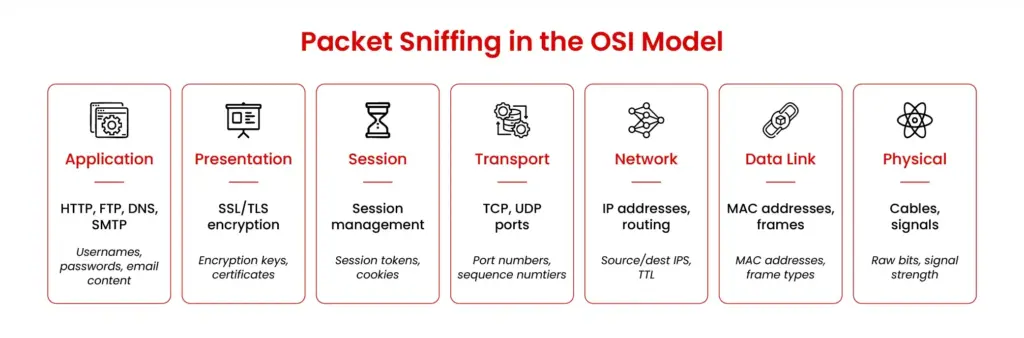
- Permission is non-negotiable. Never capture traffic on a network you don’t own or have explicit, written authorization to test.
- Capture only what you need. Snagging everything is not only messy; it probably means you’re collecting personal data you have no right to have.
- Anonymize it. If you have to share a packet capture, scrub it clean of IP addresses and any sensitive content.
- Lock up your captures. These files can contain passwords and secrets. Encrypt them.
- Train your people. Everyone who might use these tools needs to understand the legal and ethical boundaries.
What's Next? The Future of Sniffing
The game is changing. With encryption like HTTPS becoming the default, looking inside the packets is getting harder. The future is about analyzing the metadata, the patterns, timing, and volume of traffic to spot anomalies.
The Bottom Line
Knowing what these tools do and knowing how to use them purposefully in a real engagement are two different things. EC-Council’s Certified Ethical Hacker AI (CEH AI) certification provides the offensive context: how packet capture fits into reconnaissance, how tools like Wireshark are used in practice during a penetration test, and what defenders should be looking for in their own traffic. Complementing this offensive perspective is EC-Council’s Certified Network Defender (CND) certification, which provides the defensive counterpart: how to detect unusual traffic patterns, how to deploy network monitoring at scale, and how to build the visibility infrastructure that makes tools like those mentioned here genuinely useful rather than overwhelming. For professionals who spend real time on network analysis and want a structured framework around the toolset covered in this article, both certifications are worth reviewing in detail.
About the Author

Omar Rajab
Omar Rajab is a cybersecurity analyst and penetration tester at Black Hatch, with four years of experience in ethical hacking. He writes his own security tools and analyzes and mitigates vulnerabilities by planning and implementing security measures to protect computer systems, networks, and data. He also teaches several cybersecurity subjects, delivering training on mobile hacking, networking hacking, offensive and defensive security, and most importantly, providing security awareness for all ages.
FAQs
What is a packet sniffing tool?
Packet sniffing tools help capture and analyze network traffic (data packets). The tools range in USP from command-line sniffers to forensic reconstruction tools, wireless sniffers, and network security monitors.
What is packet sniffing in cybersecurity?
Packet sniffing involves intercepting, collecting, and inspecting network packets to diagnose problems, discover vulnerabilities, and detect security incidents. In cybersecurity, packet sniffing tools are helpful in detecting threats, finding vulnerabilities in networks, testing Wi-Fi security, conducting forensic reconstruction, etc.
What is the best packet sniffing tool?
The best one depends on the task for which you require the packet sniffing tool. The above blog covers 25 tools, each satisfying a unique purpose. The tools are segregated into enterprise, free, and specialist categories. For example, if you’re looking for security testing, Burp Suite or Scapy are your best packet sniffing tools; for threat hunting, Zeek and NetworkMiner are the best fit.
Is Wireshark a packet sniffing tool?
Yes, Wireshark can be used for packet sniffing. It’s a free, open-source tool available for UNIX and Windows. You can use it to intercept live packet data from different network media types.
What software is used for packet sniffing?
Common packet sniffing tools or software include Wireshark, Burp Suite, Zeek, dsniff, NetworkMiner, and many enterprise solutions, such as NETSCOUT and SolarWinds. You can also build your own custom capture application using software such as Pcap4J, a Java library.
Can packet sniffing detect cyberattacks?
Packet sniffing can help cybersecurity professionals detect cyberattacks by providing invaluable information for confirming incidents, reconstructing attacker activity, and detecting intrusions. It can also be misused by attackers to steal data and discover sensitive information. Certification courses like CEH AI help professionals build the offensive skills required to use packet sniffing tools for reconnaissance and know what to look for in captured data.