


Let’s examine what may sound technical but is actually a cornerstone of network security: MAC (Media Access Control) addresses. Think of a MAC address like your device’s fingerprint on a local network. It’s a unique, factory-assigned code burned into its network card. Switches use it to know where to send data, and sometimes, networks use it as a basic form of access control, like a bouncer checking a simple ID card at the door.
MAC address spoofing is the act of changing that fingerprint, like putting on a digital disguise, which can be used for good or bad reasons. A network admin might do it to replace a broken network card without messing up all their security rules. But an attacker can do it to sneak past a digital bouncer, impersonate a trusted device, and make it incredibly hard for you to figure out who they are during an investigation.
This isn’t a guide on how to do it. Instead, it’s for the IT professionals, security analysts, and network defenders who need to understand the threat. We’ll break down why it works, how to spot it, and most importantly, how to build a network that doesn’t crumble because of it. We’ll go beyond the basics to explore the real-world implications and advanced defensive strategies.
The Basics: What’s a MAC Address and Why Does It Matter?
Every device that connects to a network, your laptop, your phone, or a server, has a network interface card (NIC), and each one has a hardcoded, unique MAC address. It’s a 48-bit number, usually written as hex digits in six pairs (like 00:1A:2B:3C:4D:5E). The first half is the vendor code (OUI), and the second half is a unique serial (IEEE Standards Association, n.d.).
This address is used for communication within your immediate local network (your LAN or Wi-Fi). It doesn’t travel across the internet. Here’s where it becomes critical for network operation:
- Switching: This is its primary job. Network switches are “learning” devices. They see which MAC address is on which port so they can intelligently send data directly to the right device, instead of blasting it to everyone.
- Port Security: You can configure a switch to only allow traffic from specific, pre-approved MAC addresses on certain ports. This is a common, though weak, physical security measure.
- Network Access Control (NAC): Some corporate Wi-Fi networks or security systems use MAC addresses as part of a “whitelist” to decide if a device is allowed to connect.
- Troubleshooting and Forensics: When a user can’t get online or a security incident occurs, logs full of MAC addresses are the first place admins look to trace a device’s activity on the network.
The core security issue? There’s no built-in cryptographic way for the network to verify that a MAC address is genuine. The network has to take the device’s word for it. It’s a system built on trust, not proof. And that inherent trust is the loophole that spoofing exploits (MITRE ATT&CK, 2020).
How Spoofing Actually Works: The Conceptual Breakdown
At a high level, spoofing is a deceptively simple process. The ease with which it can be done is what makes it so dangerous.
- Reconnaissance: Picking a Target. First, the attacker needs to find a useful MAC address to copy. This is often done with simple, passive tools that listen to network traffic (such as tcpdump or Wireshark) or by scanning the network with commands like arp-scan. They’re looking for the MAC address of the network gateway, a trusted server, or any device that is already authorized on a restricted port or Wi-Fi network.
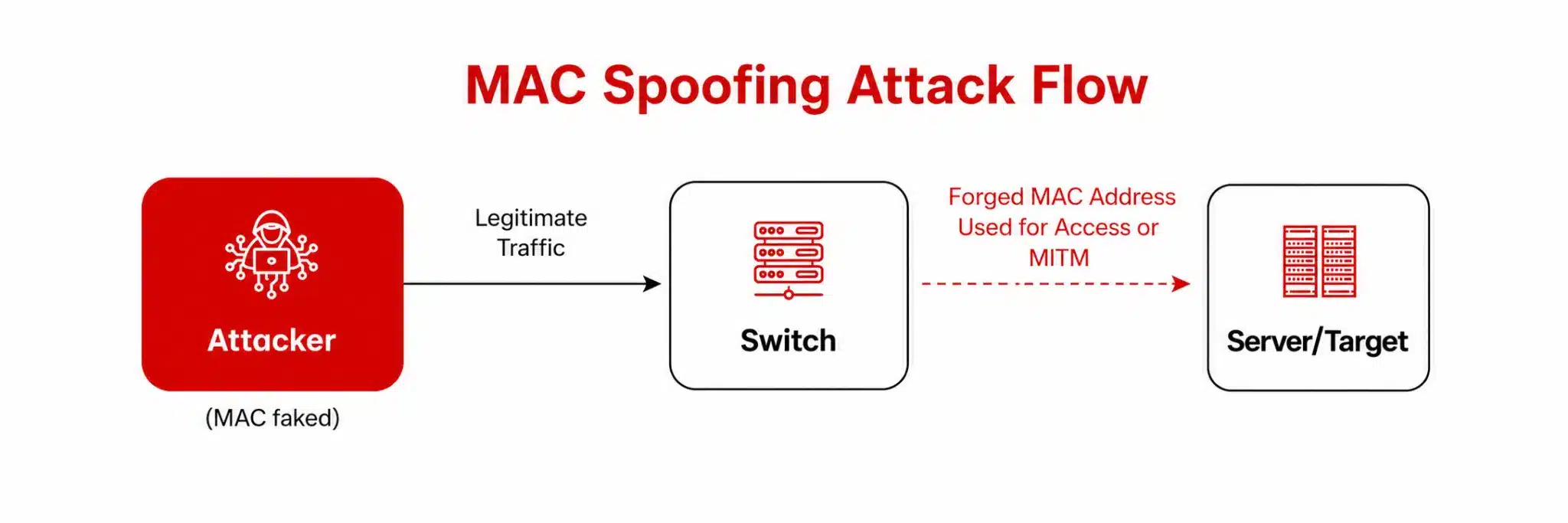
- Impersonation: Putting on the Mask. This is the spoofing itself. The attacker uses a simple command in the operating system to change their NIC’s reported MAC address. On Linux, it’s often the ip link set command. On Windows, it can be done through the Device Manager or with PowerShell. The change is usually instantaneous and requires no reboot. Now, from the network’s perspective, all frames from the attacker’s device appear to originate from the trusted MAC address.
- Exploitation: Abusing the Trust. This is where the damage is done. If the network uses MAC-based filtering, the attacker might now have access to a virtual local area network (VLAN) or network segment they shouldn’t. They can also cause disruption. For example, if they spoof the MAC address of the default gateway, they could cause a man-in-the-middle (MitM) scenario, intercepting traffic from other devices on the network. Furthermore, in the system logs, their malicious activity gets mixed up with the legitimate device’s history, creating a forensic nightmare and complicating incident response.
The big, undeniable takeaway for defenders: Never rely on a MAC address alone for any meaningful security decision. It is a fundamentally weak form of identification.
It's Not All Bad: Legitimate Reasons to Change a MAC Address
Before we dive into the dark side, it’s only fair to acknowledge that there are perfectly valid, even necessary, reasons to change a MAC address. Context is everything.
- Hardware Replacement and Maintenance: This is the most common legitimate use. If a critical server’s network card fails, the new card will have a new MAC address. This could break Dynamic Host Configuration Protocol (DHCP) reservations, firewall rules, or software licenses tied to the old MAC. Spoofing the old MAC address on the new card allows for a seamless swap without re-engineering the network.
- Privacy Protection: This is happening on your phone right now. Modern iOS and Android devices use random, changing MAC addresses when they probe for available Wi-Fi networks (Apple, 2025; Android, 2026). This prevents retailers, advertisers, or other trackers from building a profile of your movements based on your device’s unique MAC address. It’s a privacy-by-design feature.
- Software Development and QA Testing: Developers and quality assurance (QA) teams often need to simulate multiple unique devices on a single machine. Spoofing MAC addresses allows them to test how their software or network configuration handles different devices without needing a room full of physical hardware.
- Troubleshooting Network Issues: Network administrators might deliberately cause a MAC address conflict in a controlled lab environment to understand how their network monitoring tools alert them, ensuring they are prepared for a real incident.
The key differentiator between legitimate use and an attack is authorization and intent. Legitimate uses are controlled, documented, and performed by authorized personnel for a specific operational purpose.
The Attacker's Playbook: Why They Bother with Spoofing
So, why would a malicious actor go through this trouble? Because it’s a low-effort tactic that can provide a high payoff, especially in poorly defended environments. Here are their common goals:
- Bypassing Basic Access Controls: The classic example is evading a MAC-filtered guest Wi-Fi. If the attacker can sniff the MAC address of an allowed device (like a conference room printer), they can clone it to get free internet access for malicious activity.
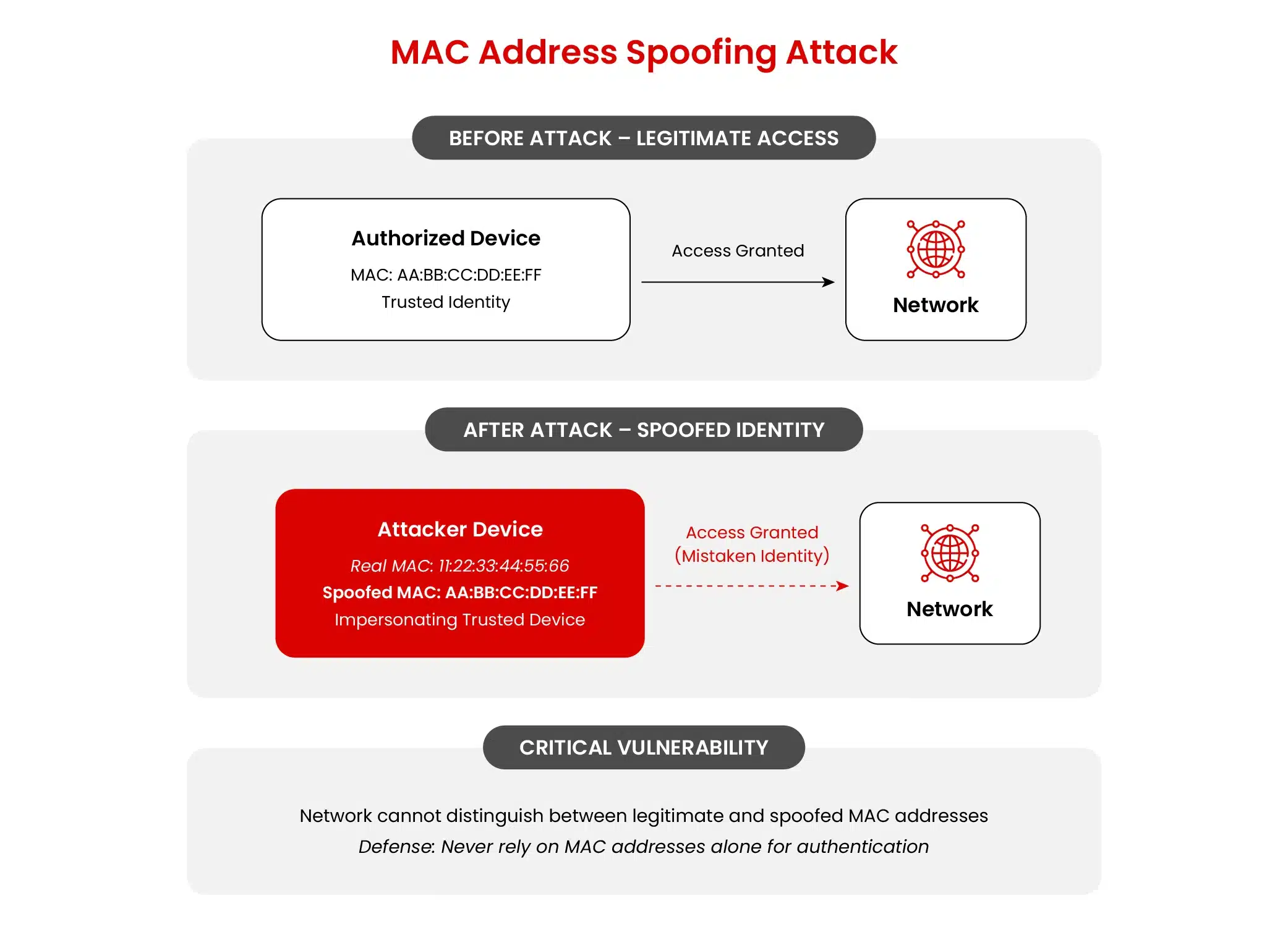
- Evading Detection and Attribution: This is a huge one for post-breach persistence. If an attacker gains access to a network, they can spoof the MAC address of an innocuous, always-on device (like an IP phone or a network-connected thermostat). Their malicious traffic then blends in with the normal traffic of that device, making them much harder to spot in logs and during forensic investigations.
- Impersonating a Critical Device: Some network segments are restricted to specific types of devices. An attacker might spoof the MAC address of a printer or an IoT device to gain a foothold on a VLAN with weaker security controls, using it as a stepping stone to more valuable targets.
- Getting Around a Simple Ban: If a network administrator blocks a malicious device by its MAC address, a novice attacker can simply change the MAC address to bypass the block. This forces defenders to use more sophisticated detection methods.
- Facilitating MitM Attacks: By spoofing the MAC address of the default gateway, an attacker can trick other devices on the local network into sending their traffic to the attacker’s machine first. This allows for session hijacking, credential theft, and data interception.
It’s a versatile trick that highlights the danger of relying on a single, weak factor for security.
Seeing the Invisible: Red Flags and How to Spot MAC Address Spoofing
You can’t always prevent spoofing at the source, but you can definitely spot the signs if you’re looking in the right places. Vigilant monitoring is your best defense. Keep an eye out for these patterns in your network logs and telemetry:
- The Impossible Traveler (Duplicate MAC Addresses): This is the biggest red flag. The same MAC address shows up on two different switch ports, especially in different physical locations, within a short amount of time. A MAC address cannot be in two places at once; this almost always indicates spoofing.
- Identity Crisis on a Port (MAC Flapping): A single switch port shows a rapidly changing sequence of MAC addresses. While this could be a legitimate multi-port device like a laptop dock, it’s highly suspicious on a standard user port and warrants investigation.
- Stranger in a Secure VLAN: A new, unknown MAC address suddenly appears on a highly sensitive network segment, such as a Payment Card Industry Data Security Standard (PCI DSS) cardholder data environment or a server management VLAN. Your asset inventory should make this stick out like a sore thumb.
- Weird DHCP Logging: Your DHCP server logs show the same MAC address being assigned multiple IP addresses in quick succession or requesting an IP address from an unexpected subnet.
- ARP Table Anomalies: You might see an IP address mapped to two different MAC addresses in the Address Resolution Protocol (ARP) caches of other devices, indicating a conflict possibly caused by spoofing.
These indicators aren’t definitive proof on their own; there can be benign explanations, but they are strong triggers that should launch a deeper investigation.
Building a Fortress: Effective Defense-in-Depth Strategies
The goal isn’t to make MAC address spoofing impossible; that’s a technical challenge. The goal is to make it useless. If an attacker spoofs a MAC address but gains no advantage and gets detected immediately, they’ve wasted their effort. Here’s how to build that layered defense:
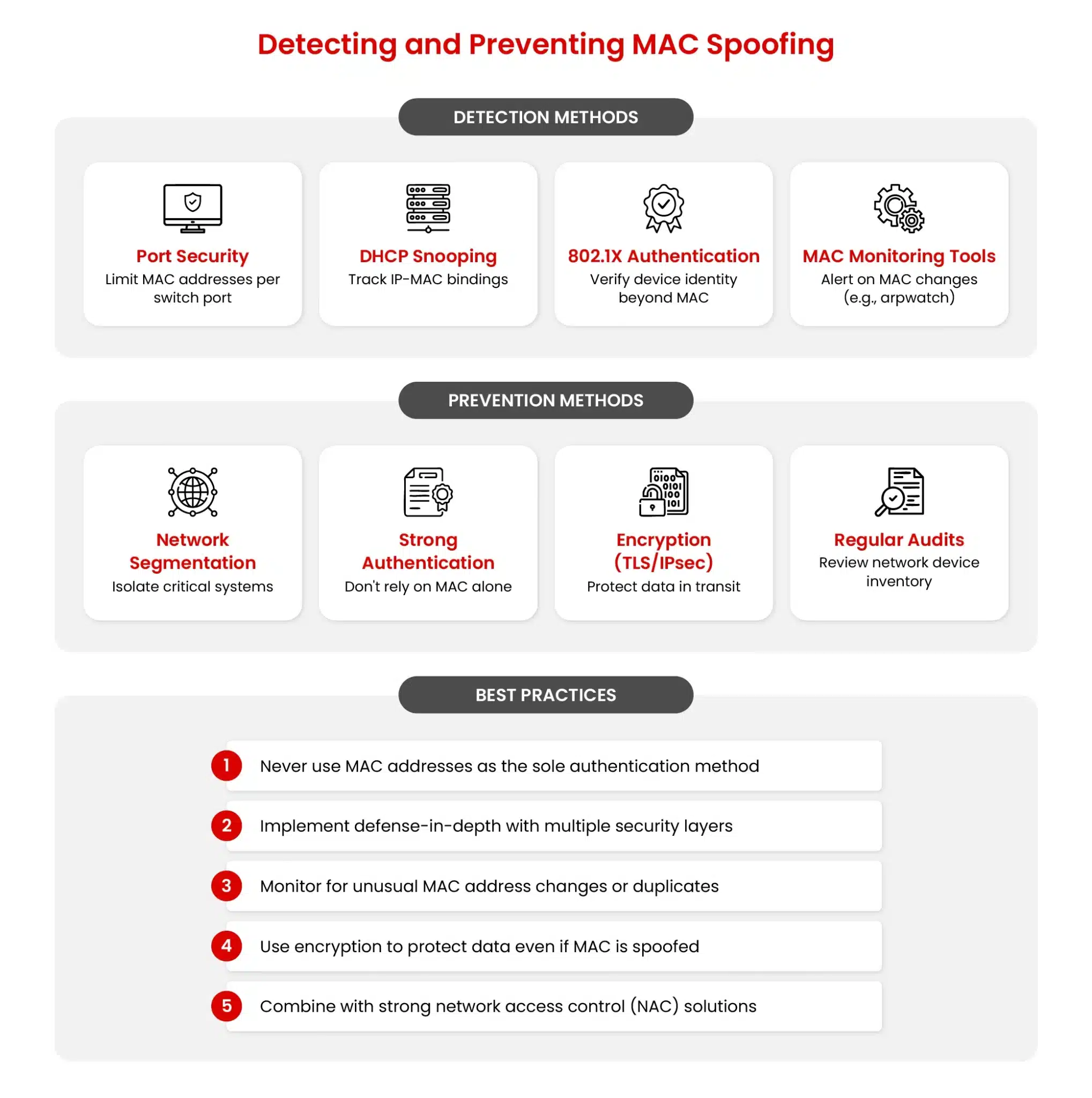
- Eliminate the Incentive: Stop Using MACs for Real Security.
This is the number one, most important rule. For any important network access, implement IEEE 802.1X authentication. This standard provides port-based NAC, requiring a user to provide credentials (username/password) or, better yet, a device certificate before being granted network access (IEEE Standards Association, 2020). The MAC address becomes irrelevant; the identity is what matters. This is the cornerstone of a Zero Trust approach at the network layer (NIST SP 800-207, 2020). - Harden Your Network Infrastructure: Switch Security 101.
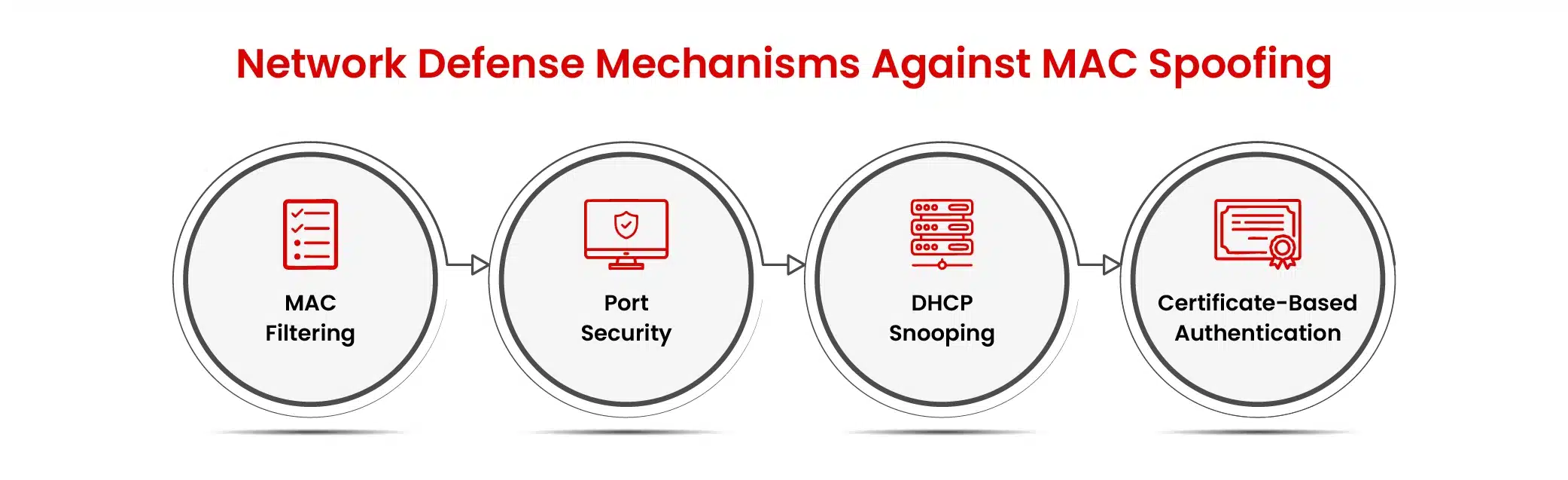
- Port Security: Configure your access-layer switches to only allow a specific, small number of MAC addresses per port (often just one or two). Define a violation policy that shuts down the port or restricts it to a “quarantine” VLAN if an unauthorized MAC tries to connect.
- DHCP Snooping: This is a crucial switch feature. It builds a trusted database of which MAC addresses got which IP addresses from authorized DHCP servers. It blocks rogue DHCP servers and is a prerequisite for the next defense.
- Dynamic ARP Inspection (DAI): DAI uses the DHCP snooping database to validate ARP packets. If an attacker spoofs a MAC address and then tries to send a malicious ARP reply (“I’m the gateway!”), DAI will check it against the trusted database and drop the fraudulent packet, preventing most ARP poisoning attacks that often follow MAC address spoofing (Cisco, 2024).
- Limit the Blast Radius: Strategic Network Segmentation.
Never run a “flat” network where every device can talk to every other device. Use VLANs and firewalls to create segments. Put guest Wi-Fi, IoT devices, and untrusted systems in their own isolated segments. If an attacker spoofs a MAC address there, they can’t pivot to your critical servers holding sensitive data. Segmentation contains the problem. - Know What You Have: Maintain an Accurate Asset Inventory.
Use a Configuration Management Database (CMDB) or a dedicated asset management tool. Know what devices are on your network, what their legitimate MAC addresses are, what they are used for, and who is responsible for them. Automate this process where possible. If a new MAC address appears that isn’t in your inventory, you have an immediate alert condition. - Add Friction with Multi-Factor Authentication (MFA).
This is a critical control that operates at a higher layer. Even if an attacker successfully spoofs a MAC address and gains network access, MFA on applications, virtual private networks (VPNs), and administrative interfaces can stop them from accessing the data and systems they’re after. Intercepted credentials become useless without the second factor. - Invest in Visibility: Centralized Logging and Monitoring.
Aggregate logs from your switches, wireless controllers, DHCP servers, and firewall into a security information and event management (SIEM) system. Create correlation rules to automatically flag the red flags we discussed earlier, like duplicate MAC addresses or MACs on sensitive VLANs. You can’t investigate what you can’t see.
Incident Response: A Practical Playbook for a Suspected Spoofing Attack
If your monitoring alerts you to a potential MAC address spoofing incident, a calm, methodical response is key. Panic leads to mistakes.
- Step 1: Contain and Isolate. The priority is to stop any potential damage. Identify the specific switch port and/or wireless access point involved. Most network management systems allow you to administratively shut down the port or move it to a quarantined VLAN that has no internet or internal network access.
- Step 2: Gather Evidence. Now, collect the forensic data you’ll need for the investigation and potentially legal action.
- Pull the MAC address table (CAM table) history from the affected switch.
- Export the DHCP lease logs for the time period in question.
- If you have a network TAP (Test Access Point) or SPAN (Switched Port Analyzer) port, capture packets from the affected segment.
- Check your wireless controller for association logs and client details.
- Step 3: Correlate with Endpoint Data. This is where you determine if this is a spoofing attack or a compromised legitimate device. Check your Endpoint Detection and Response (EDR) tool on the device associated with the legitimate MAC address. Is there malicious activity on that endpoint? Or does the EDR data show it was perfectly healthy, confirming that another device was impersonating it?
- Step 4: Eradicate and Recover.
- If you identified a malicious device, ensure it is permanently removed from the network.
- Rotate any passwords or keys that might have been exposed during the incident.
- If a legitimate device was compromised, remediate it according to your standard procedures (e.g., wipe and reimage).
- Step 5: Learn and Harden.
- Conduct a post-incident review. How did the attacker get initial access? Why did the spoofing work? Was a control missing or misconfigured?
- Update your security policies, switch configurations, and monitor alerts based on the lessons learned.
The Bigger Picture: Legal and Ethical Lines
MAC address spoofing sits in a legal gray area that is defined entirely by intent and authorization.
- Legitimate Administration: An admin changing a MAC for hardware maintenance is performing a sanctioned, logged activity.
- Unauthorized Access: Using MAC address spoofing to gain access to a network without permission is a criminal offense in most jurisdictions, violating laws like the Computer Fraud and Abuse Act in the U.S. (Computer Fraud and Abuse Act, 1986). It also blatantly violates corporate acceptable use policies.
- Authorized Security Testing: Penetration testers and red teams use MAC address spoofing during engagements, but only under strict, written contracts that define the scope and rules of engagement. This is ethical and necessary for improving security.
The rule is simple: Always have explicit, written permission before performing any kind of network testing, including MAC address spoofing.
Conclusion: From Weakness to Strength
MAC address spoofing remains a prevalent technique because it preys on a fundamental, inherited trust model in local area networks. It’s simple to execute and can be devastatingly effective against networks that haven’t evolved beyond basic security.
But for modern defenders, the path forward is clear. The solution is not to fight a losing battle to “secure” the MAC address layer. Instead, we must build our security on stronger, identity-centric foundations. By implementing 802.1X, hardening network switches, strategically segmenting traffic, maintaining vigilant monitoring, and practicing incident response, we can render MAC address spoofing a noisy, ineffective tactic.
In the end, a robust security posture ensures that even if an attacker puts on a disguise, they find themselves locked in a room with nothing to steal and alarms blaring all around them.
Building that level of resilience requires structured training across both offensive and defensive domains. EC-Council certifications like the Certified Ethical Hacker AI (CEH AI) focus on building hands-on understanding of network reconnaissance and session hijacking training, while the Certified Network Defender (CND) addresses network monitoring, including MAC log analysis, using tools like Wireshark, tcpdump, etc.
References
Android. (2026, April 10). MAC Randomization Behavior. https://source.android.com/docs/core/connect/wifi-mac-randomization-behavior
Apple. (2025, December 05). Use Private Wi-Fi Addresses on Apple Devices. https://support.apple.com/en-us/102509
Cisco. (2024, October 09). Cisco Nexus 7000 Series NX-OS Security Configuration Guide 8.x. https://www.cisco.com/c/en/us/td/docs/switches/datacenter/nexus7000/sw/security/config/cisco_nexus7000_security_config_guide_8x/configuring_dynamic_arp_inspection.html
Computer Fraud and Abuse Act. (1986). 18 U.S. Code § 1030 – Fraud and related activity in connection with computers. Cornell Law School, Legal Information Institute. https://www.law.cornell.edu/uscode/text/18/1030
IEEE Standards Association. (n.d.). Registration Authority. https://standards.ieee.org/products-programs/regauth/
IEEE Standards Association. (2020, January 30). IEEE 802.1X-2020 – Port-Based Network Access Control. https://standards.ieee.org/standard/802_1X-2020.html
MITRE ATT&CK. (2020). Technique T1557.002: Adversary-in-the-Middle – ARP Cache Poisoning. https://attack.mitre.org/techniques/T1557/002/
NIST SP 800-207. (2020, August). NIST SP 800-207: Zero Trust Architecture. https://csrc.nist.gov/publications/detail/sp/800-207/final
About the Author

Omar Rajab
Omar Rajab is a cybersecurity analyst and penetration tester at Black Hatch, with up to four years of experience in ethical hacking. He writes his own security tools and analyzes and mitigates vulnerabilities by planning and implementing security measures to protect computer systems, networks, and data. He also teaches several cybersecurity subjects, delivering training on mobile hacking, network hacking, offensive and defensive security, and most importantly, providing security awareness for all ages.