

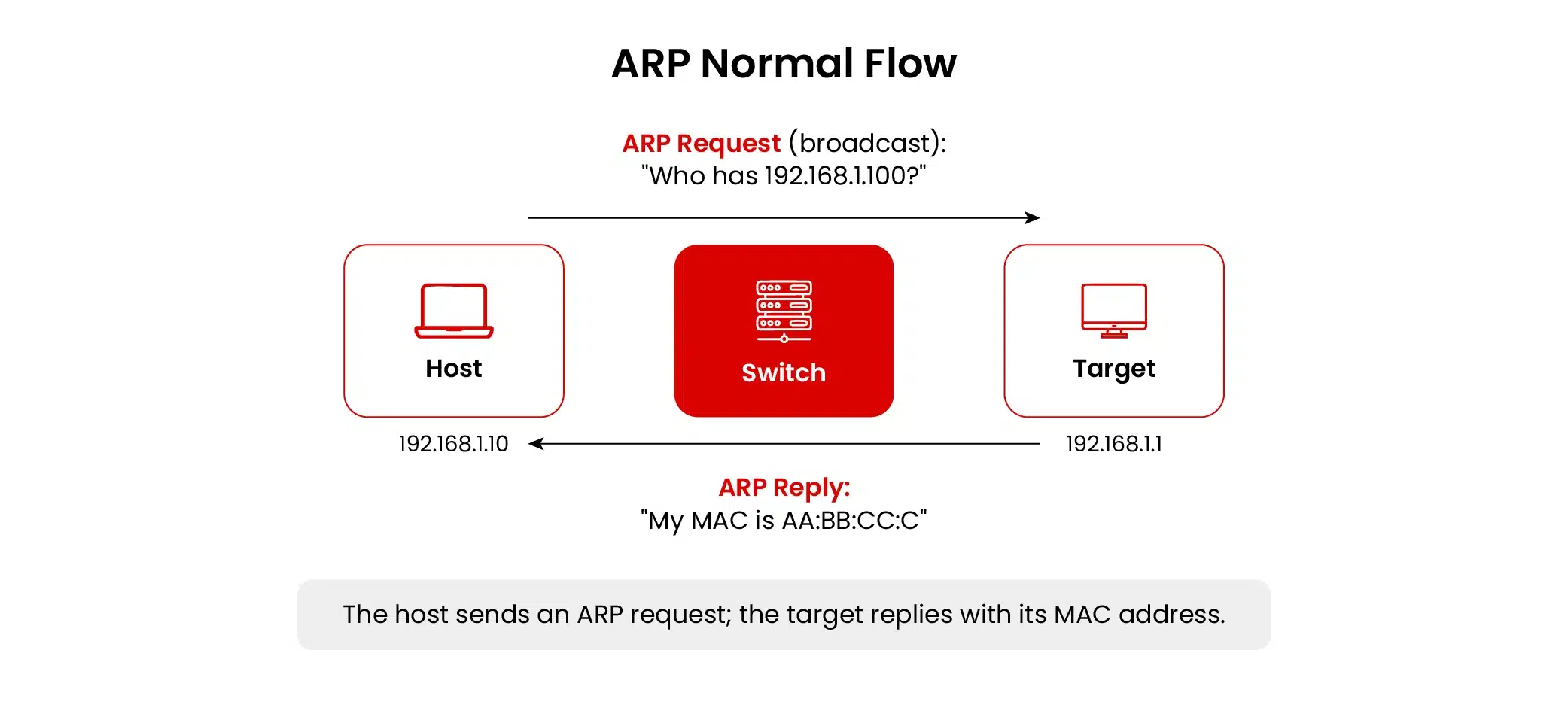
Let’s talk about how networks really work. We build them on trust. For a laptop to talk to a server, your phone to connect to a Wi-Fi, or a smart device to ping the cloud, they all rely on a simple, decades-old protocol called ARP, or Address Resolution Protocol. ARP’s job is straightforward: it translates IP addresses into physical MAC addresses, so data packets know exactly where to go (Plummer, 1982).
The problem? ARP was born in a friendlier time. It assumes everyone on the network is telling the truth. There’s no verification. This blind trust is its Achilles’ heel, and attackers exploit it through a trick called ARP poisoning (also called ARP spoofing). By lying in ARP responses, they convince your device that their computer is the network gateway or another trusted machine. Suddenly, your traffic flows through them. They can eavesdrop, alter data, or just shut things down.
This isn’t a textbook threat. It’s a real-world weapon used for everything from snooping on campus networks to corporate espionage. It’s the first step in more complex attacks, setting up a perfect man-in-the-middle (MITM) position to steal logins or deliver malware. On a poorly secured network, an attacker can own the traffic in minutes.
Let’s break it down. We’ll look at how ARP works, how the attacks play out, the real damage they’ve caused, and, most importantly, how to build your defenses.
The Nuts and Bolts of ARP
Think of your local network like a neighborhood. IP addresses are the street addresses, but Media Access Control (MAC) addresses are the specific lock on your front door. ARP is the process of looking up a street address to find out which lock it uses.
Here’s how a normal conversation goes:
- Your computer (Device A) shouts to the entire network, “Hey, who has IP address 192.168.1.100? Send your MAC address to me!”
- The correct device (Device B) hears the shout and replies directly, “That’s me. My MAC address is AA:BB:CC:DD:EE:FF.”
- Your computer makes a note of this pairing in its short-term memory (the ARP cache) and starts sending data.
The weakness is right there in step two. Your computer will believe any answer it gets, no questions asked. It’s like accepting directions from anyone who shouts back, without checking a map.
What Exactly Is ARP Poisoning?
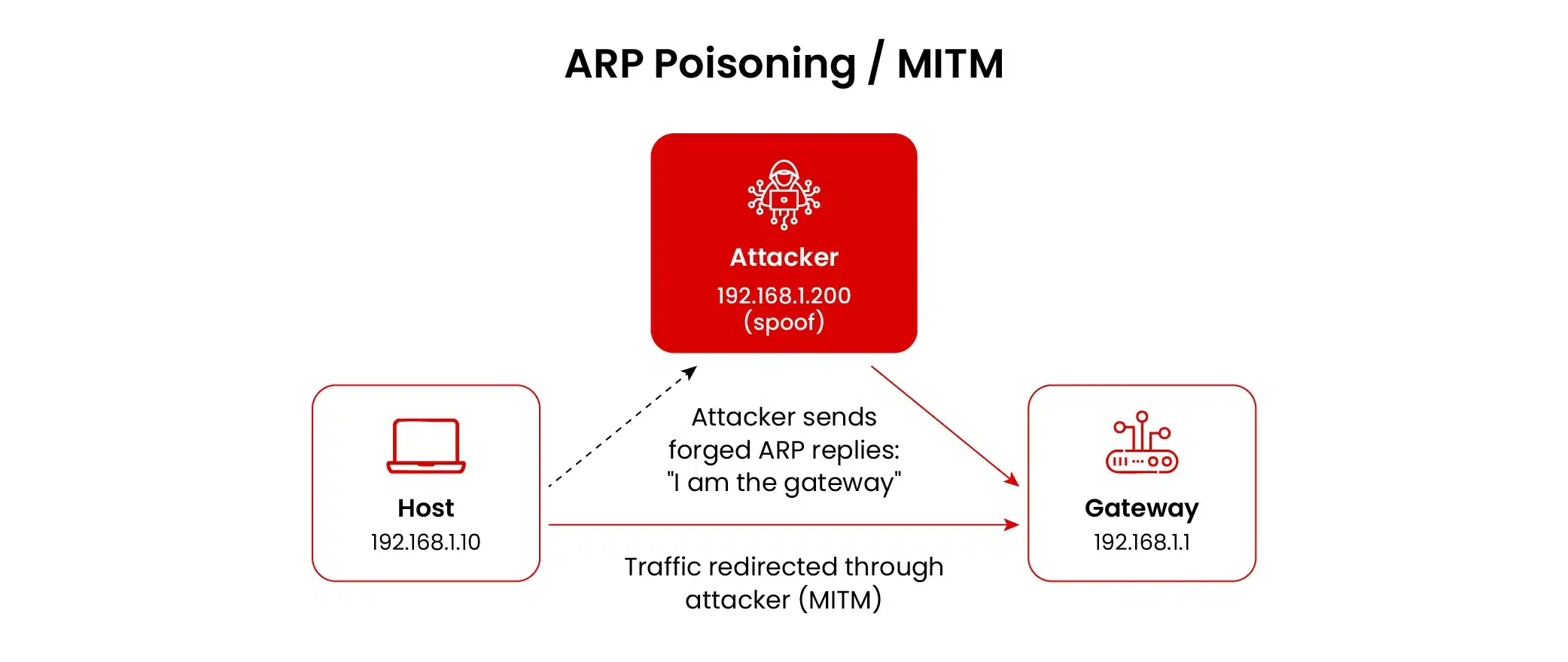
ARP poisoning is the network equivalent of cutting into a phone line. An attacker on the same local network sends out a forged message that says, “Hey, I’m the router! My MAC address is [Attacker’s MAC].” Your computer, trusting as ever, updates its ARP cache with this bogus information. Now, all your internet traffic gets sent to the attacker’s machine first. They can then:
- Silently listen in, grabbing passwords and sensitive data.
- Change the data on the fly, maybe redirecting your download to a malicious file.
- Just drop the packets, causing a denial-of-service.
- Use what they steal to break into other systems on the network.
It works because the protocol itself has no way to tell a lie from the truth.
How These Attacks Typically Go Down
Pulling this off isn’t rocket science. At a high level, it follows a predictable pattern:
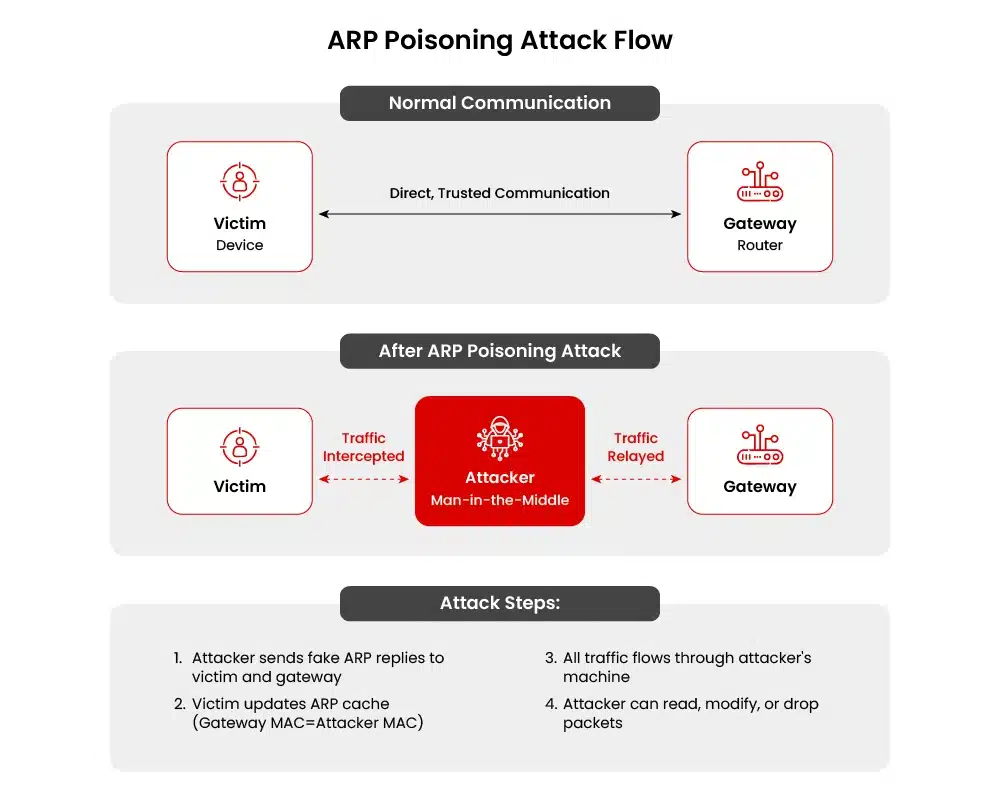
- Scoping the Place: The attacker first quietly maps the network. They figure out who’s who, especially the IP of the default gateway, which is the prime target.
- Telling the Lie: They start flooding the network with fake ARP replies, poisoning the caches of their target devices.
- Becoming the Middleman: Once the caches are poisoned, traffic starts flowing through the attacker’s machine. The MITM position is achieved.
- Staying in Place: They must keep sending these fake messages to stop the correct mappings from returning.
- Cashing In: With access to the traffic, they harvest what they came for: credentials, session cookies, etc.
The core of the problem is trust in local broadcast replies. Our defenses need to either stop the lies from working or make the stolen information useless.
A Quick Look Back
ARP poisoning hit the scene in the late 90s and early 2000s. University networks and corporate LANs were the perfect playground. Early tools, often written to demonstrate security flaws, made this a staple for pen testers and hackers alike.
Its role has evolved:
- Early 2000s: Campuses and open Wi-Fi hotspots were gold mines for stealing emails and game login info.
- The HTTPS Era: As web traffic became encrypted, plaintext password capture got harder. Attackers adapted, focusing on stealing session cookies or trying to downgrade connections.
- The IoT Explosion: The flood of cheap, poorly secured smart devices brought ARP poisoning back into vogue for spying on homes or even industrial systems.
Nowadays, you’ll often see it combined with DNS tricks or other techniques for a bigger punch.
Real-World ARP Poisoning Examples
Campus Networks (Early 2000s)
Back then, university networks were often wide open. A student could plug into a lab port and easily capture traffic from thousands of peers. Instant messages, emails, and even early online banking logins were snatched up. The resulting scandals forced schools to encrypt their Wi-Fi, split student and admin networks, and start watching for weird ARP activity.
- The Fallout: Reputational hits, regulatory trouble over student data privacy, and a dash to lock things down.
The Small Bank Heist
In one real case, attackers got inside a small finance office and used ARP poisoning from a connected laptop. They snagged banking session tokens and initiated fraudulent transfers. Because the network wasn’t segmented and detection was slow, the damage was significant.
- The Lesson: The threat isn’t always from the outside. An insider, a contractor, or an infected device on the inside can do immense harm. Critical systems need multi-factor authentication (MFA) and to be walled off from the general network.
Smart Home Spying
Security researchers love to demonstrate this. They’ll take common IoT devices, cameras, smart plugs, and thermostats, and show how ARP poisoning lets them intercept video feeds or fake control commands. For consumers, it’s a scary demo. For factories using old industrial IoT, it’s a real and present danger.
- The Impact: Violated privacy, disrupted operations, and a strong argument for buying more secure devices and putting them on a separate network.
The Quiet Insider
An employee with a grudge and physical access used ARP spoofing over several weeks to redirect and steal sensitive design documents. The theft was only caught when a network monitoring tool flagged an unusual spike in outbound data.
- The Takeaway: Technical controls need a partner. You also need to monitor user behavior and strictly control vendor and third-party access.
How to Spot Trouble
Quick Host Checks
- On Linux, run ip neigh show. Be suspicious if you see multiple IP addresses pointing to the same MAC, or if the mappings keep changing weirdly.
- On Windows, use arp -a. Check that the MAC address for your gateway is the same on all company machines.
Keep Constant Watch
- ARPWatch: This is a classic tool that logs ARP changes and can alert you to suspicious flip-flops.
- Get Your Logs Talking: Feed ARP logs, switch syslogs, and Dynamic Host Configuration Protocol (DHCP) logs into your security information and event management (SIEM). Look for weird patterns like an ARP change for a host immediately followed by a new DHCP lease.
- Network Tools: Platforms like Zeek or Snort can be tuned to spot ARP floods or other oddities.
Here’s a sample Suricata rule to catch a flood of gratuitous ARP replies (tune it to avoid false alarms):
alert arp any any -> any any (msg:”Possible ARP Poisoning Attempt – Too many gratuitous replies”; threshold: type threshold, track by_src, count 5, seconds 60; sid:1000001; rev:1;)
Building Your Defenses: A Practical Stack
Don’t rely on one thing. Layer your defenses.
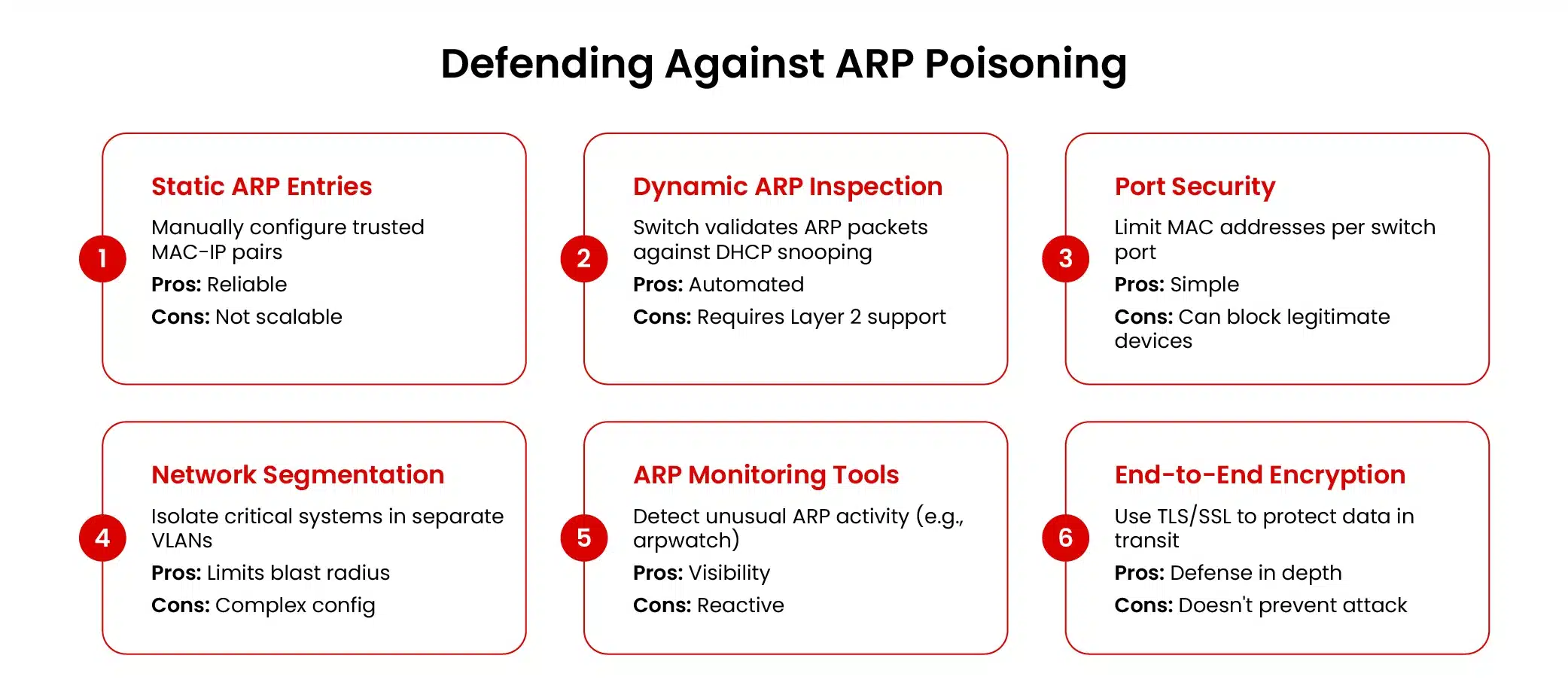
- Segment Your Network: Use VLANs to create smaller, trusted zones (NIST, 2020). This contains any poisoning to a tiny area.
- Get Your Switches Smart: This is huge.
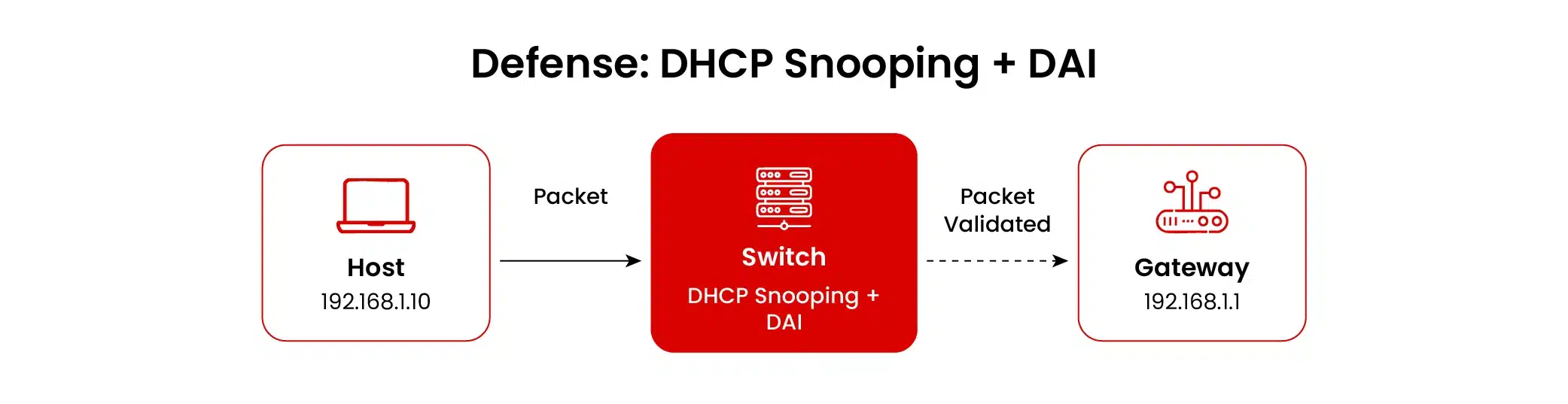
- Dynamic ARP Inspection (DAI): This is your star player. The switch checks every ARP packet against a trusted table (built by DHCP snooping) and drops the fakes (Cisco, 2024).
- Port Security: Lock switch ports to a specific number of MAC addresses. Shut down ports that violate the rule.
- Basic Hygiene: Disable unused ports and stick them in a dead-end virtual local area network (VLAN).
- Encrypt Everything: Make the prize worthless. Enforce HTTPS and use virtual private networks (VPNs). If the attacker can’t read the traffic, the win is hollow.
- Protect the Endpoints: Good endpoint detection and response (EDR) software can spot processes trying to mess with ARP tables.
- Know What’s on Your Network: Audit connected devices. Keep tight control over who has admin rights.
What to Do When It Happens: An Action Plan
- Triage & Contain: Figure out which parts of the network are affected using your monitoring tools. Isolate those VLANs or suspicious devices immediately.
- Gather Evidence: Pull logs from ARPWatch, switches, and DHCP servers. If you can, capture traffic from a mirrored port.
- Kick Them Out: Physically remove or network-isolate the malicious device. Flush the ARP caches on critical servers and workstations.
- Recover Safely: If you suspect credentials were stolen or malware was installed, wipe and reimage the affected machines. Rotate all passwords and keys that might have been exposed.
- Learn from It: Do a post-mortem. Why did this work? Was Dynamic ARP Inspection (DAI) not configured? Is the network too flat? Update your rules and run a tabletop exercise so you’re faster next time.
What About the Future? IPv6 and Beyond
IPv6 replaces ARP with the Neighbor Discovery Protocol (NDP). It’s a more modern protocol and even has a secure version called SEND that uses cryptography (Arkko et al., 2005). But let’s be real: SEND is complex, and hardly anyone uses it.
So, new tricks have emerged, like Neighbor Discovery spoofing. The same old advice still applies: segment, monitor, and control access. And in today’s “cloudy” world, the “local network” concept is changing. Monitoring the traffic between services (east-west) is becoming just as critical.
It’s Also a People Problem
- Kill Cleartext: Get rid of old, unencrypted protocols like Telnet and FTP inside your network.
- Demand MFA: MFA makes stolen passwords much less useful.
- Contract for Security: Make network access controls (NAC) and activity logging a contract requirement for vendors and contractors.
- Train Your Team: Teach employees to recognize and report anomalies, such as sudden certificate warnings or constant disconnections.
Wrapping Up
ARP poisoning is still around because it attacks a fundamental layer of network trust. While modern technologies have made casual attacks more difficult, there is still risk from insiders, misconfigured environments, and the ever-expanding collection of insecure IoT gadgets.
The solution isn’t a single product. It’s a mindset. Organizations need layered technical controls, segmentation, switch hardening, and encryption, paired with vigilant monitoring and a team ready to respond. Treat your network hygiene seriously, and you can spot and stop these attacks before they turn into a headline.
For network security professionals who want to understand this class of attack deeply enough to either demonstrate it in an authorized test or defend against it systematically, certification programs, such as EC-Council’s Certified Ethical Hacker AI (CEH AI) and Certified Network Defender (CND), provide structured, hands-on training. While CEH AI teaches you to identify loopholes by using tools to conduct vulnerability analysis and defend against sniffing and denial-of-service attacks, CND teaches you to address security across device types, including local networks, endpoints, cloud, and wireless environments.
References
Cisco. (2024). Security Configuration Guide, Cisco IOS XE 17.15.x (Catalyst 9300 Switches). https://www.cisco.com/c/en/us/td/docs/switches/lan/catalyst9300/software/release/17-15/configuration_guide/sec/b_1715_sec_9300_cg/port_security.html
NIST. (2020). NIST Special Publication 800-207: Zero Trust Architecture. https://csrc.nist.gov/publications/detail/sp/800-207/final
Plummer, D. C. (1982, November). An Ethernet Address Resolution Protocol. IETF Datatracker. https://datatracker.ietf.org/doc/html/rfc826
Arkko, J., Kempf, J., Zill, B., & Nikander, P. (2005, March). SEcure Neighbor Discovery. IETF Datatracker. https://datatracker.ietf.org/doc/html/rfc3971)
About the Author

Omar Rajab
Omar Rajab is a cybersecurity analyst and penetration tester at Black Hatch, with up to four years of experience in ethical hacking. He writes his own security tools and analyzes and mitigates vulnerabilities by planning and implementing security measures to protect computer systems, networks, and data. He also teaches several cybersecurity subjects, delivering training on mobile hacking, networking hacking, offensive and defensive security, and most importantly, providing security awareness for all ages.